显示标签为“M4V Converter Plus for Mac”的博文。显示所有博文

2016年11月7日星期一

How to Watch movies and TV shows from iCloud freely

New version of M4V Converter Plus for Mac has released on Nov 3th, 2016. The new version supports reading iCloud Movie on the Add-Movie window. And all the iCloud movies are marked with icloud icon.

Apple iCloud Service


iCloud securely stores your photos, videos, documents, music, apps, and more - and keeps them updated across all your devices. So you always have access to what you want, wherever you want it.
Apple mobile devices (iPad, iPhone and iPod Touch) running iOS 5 or newer will connect to the iCloud storage associated with your Apple ID. Then, iOS and other apps capable of saving data to iCloud will automatically synchronize that data while you're connected to the Internet.
Apple computers running Mac OS X Lion (10.7) or newer can run apps programmed to synchronize with iCloud storage.
All Apple computers can view, upload and download iCloud storage contents using the Web app at icloud.com. The look and feel of the icloud.com Web site resembles the default Apple iOS interface.
icloud-icon
You can authorize up to 10 devices to access and use iCloud with your Apple ID. This is a leap beyond the iTunes Store authorization, which is limited to five devices. You get 5GB of free storage in iCloud and you have the option to choose a plan for up to 2TB. More iCloud storage means more space to store your photos, videos, documents, and apps, so they're always available from any device. iCloud Photo Library and iCloud Drive can also help free up space on your devices.

How to watch movies and TV shows from iCloud on non-apple devices

iCloud will only show you movies that your bought through the iTunes store, using the same iTunes account that you're logged into on your device. When you buy a movie from iTunes it is automatically stored in iCloud so you can access it from any device, including your iPhone, iPad, Mac, and Apple TV. Apple offers 5 GB of free iCloud space to everyone (free 5 GB is per Apple ID, not per device), but you'll run up against that storage limit sooner than you'd think. You can free up iCloud storage space by backuping movies and TV shows.
M4V Converter Plus for Mac released its new version 4.2.4, which can support reading iCloud Movie on the Add-Movie window. You can convert the iCloud videos to other common video formats, so that you can play iCloud videos on Apple devices and more other devices. The following tutorial will show you how to convert iCloud videos to any devices you want.
<<<<<<<<<----------------------------------------->>>>>>>
<<<<<<<<<----------------------------------------->>>>>>>
1. New user can click above Download button to get the free trial version. For old user, just click the main menu bar > Check for Updates..., and install the update.
mac-v424
2. Open the new version, and click Add Movies button to the program. Different from the previous version, the new version support converting iCloud video. You can find iCloud videos are marked with icloud icon.
add-icloud
3. If you select the iCloud directly, you will find the hint as the picture shown.
add-cloud2
4. Now you can download the videos from your iTunes library. After downloading, you can add the iCloud videos to the program successfully.
add-cloud4
5. Set output format for your devices. Here you can convert iCloud videos to unprotected MP4, MOV, FLV, etc. You can also choose iPhone 7 Plus, iPhone 7, PS3/4, Google Pixel and other popular mobile players.
icloud-output
6. After all setting are done, click on the Convert button, the added iCloud videos will start conversion automatically.
icloud-conversion

2016年8月25日星期四

M4V Converter Plus announce new release Mac version 4.2.1

New version 4.2.1 of M4V Converter Plus for Mac has released on August 25, 2016, which support AD track kept, support Mac OS X 10.12 beta and fix the interface error.
As one of the best software developer, MCP Inc. dedicated to providing iTunes DRM removal solutions to worldwide customers. MCP Inc. announced the availability of a new version 4.2.1 of its popular iTunes movies Converter – M4V Converter Plus for Mac. Users already rely on its ease in converting DRM-ed M4V to unprotected video formats supported by many popular IOS and Android devices.
Now, new version 4.2.1 of M4V Converter Plus for Mac is now available for download along with three new features. It supports AD track kept with interface error fixed and supports newest Apple Mac OS Sierra 10.12 Beta.
mac-os-sierra10.12beta. 
M4V Converter Plus for Mac Overview
M4V Converter Plus for Mac can convert any iTunes M4V videos with Apple copyright protection to all popular video formats such as MP4, MOV, AVI, FLV, 3GP and WMV for your iPad, iPhone, QuickTime etc. or share them on YouTube, Facebook, DailyMotion, Flicker and more.
Besides, you can finish the conversion in 30X faster speed without quality loss using the program. It can compatible with Mac OS X 10.8, 10.9 and 10.10 perfectly. And now, the new version can work well on Apple's recently released OS Sierra 10.12 Beta.
Pricing and Availability
M4V Converter Plus for Mac is currently available for $44.95 from MCP Inc. official website. Version 4.2.1 is free upgrade to current users. A free trial version is available for users to use before they purchase. To learn more or download M4V Converter Plus for Mac, please visit http://m4vconverterplus.com/.
 interface1
About M4V Converter Plus Inc.
M4V Converter Plus Inc. is a software company that offers iTunes M4V video conversion solutions. With expertise and experience in iTunes video converter tools, its mainly products M4V converter software do well in converting m4v video you purchased or rent to QuickTime MOV, iPod, iPhone format with high speed and great quality. 
Contact Info:
Name: Amy Green
Address: P.O. Box 1568, Cortaro, AZ, United States of America
Zip code: 85652
Email: market@m4vconverterplus.com
Website: http://m4vconverterplus.com/index.html

2016年4月14日星期四

How to play iTunes movies, TV shows and music video on PlayStation®4

As we all known,  movies and TV shows purchased from iTunes Store are M4V formats with Digital rights management (DRM) protection.  And if you have an Apple Music a subscription, you can download kinds of music files in month and share and listen to them offline. But when you cancel the Apple Music subscription, all that streaming music becomes inoperable. This guide mainly talks about how to play iTunes videos and music on PS4. And let's see the best supported file formats for PS4 in order to play with no difficulties.

PlayStation®4 Supported file format

playstation-4Use  (Media Player) to enjoy videos, photos, and music saved on USB storage devices and media servers. 
You can play the following types of files:

Videos

When using a USB storage device, your video files need to be in a folder for your PS4™ system to recognize them.
  • MKV
    • Video: H.264/MPEG-4 AVC High Profile Level4.2
    • Audio: MP3, AAC LC, AC-3 (Dolby Digital)
  • AVI
    • Video: MPEG4 ASP, H.264/MPEG-4 AVC High Profile Level4.2
    • Audio: MP3, AAC LC, AC-3 (Dolby Digital)
  • MP4
    • Video: H.264/MPEG-4 AVC High Profile Level4.2
    • Audio: AAC LC, AC-3 (Dolby Digital)
  • MPEG-2 TS
    • Video: H.264/MPEG-4 AVC High Profile Level4.2, MPEG2 Visual
    • Audio: MP2 (MPEG2 Audio Layer 2), AAC LC, AC-3 (Dolby Digital)
  • AVCHD (.m2ts, .mts)

Photos

When using a USB storage device, your photo files need to be in a folder for your PS4™ system to recognize them.
  • JPEG (DCF 2.0/Exif 2.21 compliant)
  • BMP
  • PNG

Music

When using a USB storage device, your video files need to be in a folder named "Music" for your PS4™ system to recognize them.
  • MP3
  • AAC (M4A)
According to the above mentioned, PS4 support MP4 , AVI, MPEG-2, MP3, AAC, etc. But not including M4V and iTunes music. In this way, to play iTunes movies, TV shows and music on PlayStation®4, you can use the third-party converting software - iTunes video Converter and iTunes music Converter. Today  we  concentrated on the way to play iTunes movies and TV shows on PS4 easily. 

How to play iTunes movies and TV shows on PlayStation®4

M4V Converter Plus  ( Mac and Windows) is a powerful iTunes video Converter. It can remove DRM protection from iTunes movies, TV episodes and music videos, but also can convert M4V to plain Mp4AVIMPEG-1MPEG-2 and extract MP3AAC audio from iTunes video files. 
Besides, using this program, you can directly play iTunes DRM-ed M4V videos on various devices like iPhone SE, iPhone 6S, iPhone 6S plus, Samsung Galaxy S7, Google Nexus, Xbox 360PS3, etc. Now see the tutorial about how to remove DRM from iTunes videos and convert to PS4 with  M4V Converter Plus. 
At first, make sure the software you have installed
  1. Add iTunes videos to the program
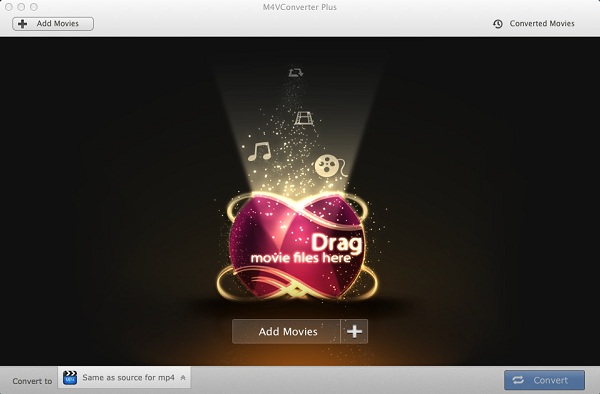
After you have downloaded and installed the latest version of M4V Converter Plus for Mac. Launch it, click Add Movies button on the right top corner. It will pop up a window, select the videos you want to convert.
Interface of M4V Converter Plus for Win

Interface of M4V Converter Plus for Mac
      2.  Set appropriate video format for PS4
In this step, you can select MP4, AVI, MPEG-2, MP3, AAC as output format. The specific method as below: find Convert to profile panel, choose the video format you want to get.
Convert iTunes M4V to MP4 on Windows

M4V to MP4 on Mac
Here you can choose Same as source as mp4. Because MP4 is the best formats for almost devices.
       3. Start converting M4V to MP4
Finally, hit the Convert button, the conversion progress will start automatically. The conversion time depends on the iTunes videos length. 
After conversion, you can connect PS4 with PC via  USB. Now you can copy converted iTunes videos on your PS4. Thus, you can play iTunes movies and TV shows on PS4 without limitations.

Related topics:

2015年7月12日星期日

M4V Converter Plus can support iTunes 12.2 perfectly

#iTunes 12.2 Apple has released iTunes 12.2 with Apple Music and Beats 1 support. M4V Converter Plus can support iTunes 12.2 perfectly. 
The new features of iTunes 12.2
Apple released a new version 12.2 of iTunes to its media player iTunes for users of OS X Yosemite and Microsoft Windows. The upgrade allows users to access the new Apple Music service and the Beats 1 radio service on their desktop computers.
iTunes 12.2 also offers iTunes users a free taste of the subscription service: For three months, users have access to a free trial of the music streaming, collation and discovery services, as well as the Beats 1 global live radio service with multiple stations that comes with an Apple Music membership. Apple will also be introducing its second attempt at an iTunes-based social network.

M4V Converter Plus can work on iTunes 12.2
M4V Converter Plus is an all-in-one DRM removal software as well as iTunes protected videos converter. It allows both Mac and Windows users to remove Apple DRM copyright from iTunes movie purchases & rentals and convert them to plain MP4, MOV, AVI and other popular video formats. It also can support iTunes 12.1 perfectly.
The latest version 12.2 of iTunes has released last week. Many iTunes users must upgrade their iTunes to the new version as soon as possible, including me. In most cases, users can use the M4V Converter Plus for iTunes 12.2 smoothly.
If you came across something error after your iTunes upgraded to version 12.2. Try some ofthe steps mentioned below.
STEP 1. Choose Preferences. Then click Advanced and check on the box beside "Share iTunes Library XML with other applications".
STEP 2.     Quit iTunes.
STEP 3.     Launch M4V Converter to have a try.


How to use M4V Converter plus for iTunes 12.2
1.       Upgrade M4V Converter plus and iTunes to the latest version. If you are new here, you can find the M4V Converter Plus download page at http://m4vconverterplus.com/index.html. And launch it.
Note: if you run the M4V Converter Plus, the iTunes 12.2 will open automatically.


2.       Click Add Movies button to import the iTunes videos you want to convert. After the Advanced Preferences settings, you still can’t find any M4V video in converter, please drag the M4V files to the converter directly from your file folder.


3.       Click the Convert to drop-down list, here are various output formats available to choose. Such as MP4, MOV, WMV, WMA and so on. Besides, the profile displays a variety of mobile devices, and each device has one or more popular output formats such as MOV, MP4, AVI, FLV, SWF, 3GP, etc. You can select the output formats as you need.


4.       Click the Convert button to start the M4V Conversion progress. 

2015年6月30日星期二

How to transfer iTunes protected movies to Galaxy S6/S6 Edge

This article is mainly to tell you how to convert your movies, TV shows and music videos purchased & rented from iTunes Store to Galaxy S6/S6 Edge.
Galaxy S6/S6 Edge overview - The next big phone
Best looking, 5.10-inch 1440x2560 display, 16-megapixel rear camera, long standby time. It is time to change new phone – Samsung Galaxy S6/S6 Edge. These outstanding features will also bring new audio-visual enjoyment to the people.

As the best media player, media library, online radio broadcaster, iTunes is used to play, download, and organize digital audio and video by more and more people. For those people who have purchased or rented many latest or classic movies from iTunes Store, and wish to enjoy these with  Galaxy S6 and S6 Edge. How can they do?
Obviously, due to apple digital rights management protection, we can’t transfer the following iTunes media to Galaxy S6 and S6 Edge directly.
In order to watch those media files, at first, we should remove the digital rights management from iTunes protected videos. And then you can convert them to the video format Galaxy S6 and S6 Edge support like MP4, WMV, etc.
M4V Converter Plus is a professional iTunes videos to Galaxy S6 and S6 Edge converter. The software is pretty simple to use, just a few mouse-clicks, you can transfer music, playlists, videos, TV shows and others from your iTunes library to your Samsung Galaxy phone, including Galaxy S6 and S6 Edge, S5, S4, S3, S2.
How to convert iTunes protected movies to Galaxy S6/S6 Edge
1.       Download, install M4V Converter Plus on your PC or Mac, then launch it.
Interface of M4V Converter Plus for Mac

The software will be opened together with your iTunes library.
Interface of M4V Converter Plus for Win
2.       Click on “Add Movies”, you can choose movies, TV shows or other videos from iTunes Store to your Galaxy phone.
3.       Galaxy S6/S6 Edge supports H.264, WMV, DivX, XviD file formats, Just click the drop-down list besides "Convert to" and choose "Android device -> Samsung Galaxy S series". Or you can choose “Same as source for mp4” for Galaxy S6/S6 Edge.
Convert iTunes M4V videos to MP4

4.       After all settings done, you can click "Convert" button to start getting rid of DRM protection and converting iTunes Videos for playing on Galaxy S6/S6 Edge easily.
  

Wait for moments, then click "History" to locate the DRM-free output file. Now you can transfer the converted plain files to your Galaxy S6/S6 Edge via cable or SD card.
System Requirements
> Mac OS X 10.8 or later.(Windows version: 
Windows XP or later version)
> At least 512M physical RAM.
> 1G Hz Intel or PowerPC processor, or above.
> 1024*768 resolution display or higher.