显示标签为“iTunes movies”的博文。显示所有博文

2017年7月4日星期二

Honor 9 vs. OnePlus 5: What is the difference

OnePlus and Honor have always been rivals, but this year sees the two brands going head-to-head more directly than ever before. With the OnePlus 5, the company focuses on high-end specs, including a ridiculous 8GB of RAM, alongside a new dual camera setup. And the Honor 9 builds on its predecessor with a few meaningful upgrades of its own, including a beautifully curved glass back panel and an enhanced dual camera system.
 
Both phones hover either side of the £400 mark — the OnePlus 5 starts at £449, while the Honor 9 undercuts it at £379. 
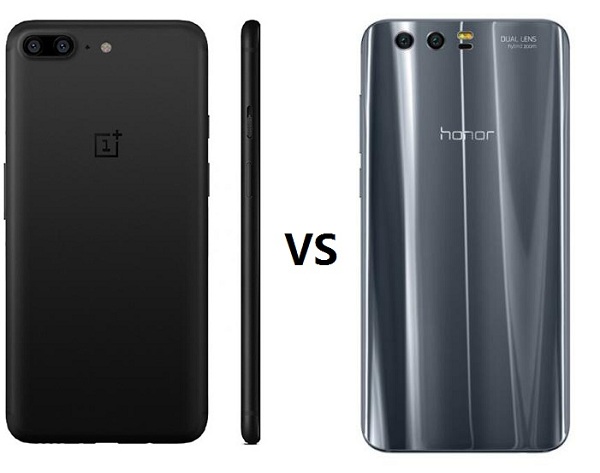
 
oneplus-5-vs-honor-9
 

Huawei Honor 9 vs OnePlus 5

CategoryHonor 9OnePlus 5
Operating SystemAndroid 7.0
EMUI 5.1
Android 7.1.1
OxygenOS 4.5
Display5.15-inch 1080p IPS LCD
Gorilla Glass 3
5.5-inch Optic AMOLED
Gorilla Glass 5
CPUHuawei Kirin 960Qualcomm Snapdragon 835
RAM4GB or 6GB6GB or 8GB
Internal Storage64 or 128GB64 or 128GB
microSDYes (Hybrid slot)No
Battery3,200 mAh3,300 mAh
Quick charging9V / 2ADash Charge
Rear camera12MP (RGB) + 20MP (monochrome), f/2.216MP (f/1.7) + 20MP (f/2.6, telephoto)
Front camera8MP, f/2.016MP, f/2.0
Water resistanceNoNo
Dimensions147.3 x 70.9 x 7.45 mm
155 g
154.2 x 74.1 x 7.25 mm
153 g

What's the difference between Honor 9 and OnePlus 5

Huawei Honor 9 comes with a 5.15-inch touchscreen display with a resolution of 1080 pixels by 1920 pixels at a PPI of 428 pixels per inch. It runs Android 7.0 and measures 147.30 x 70.90 x 7.45 (height x width x thickness) with 155 g weight.
 The OnePlus 5 comes with a 5.5-inch 1080p AMOLED touchscreen display covered in Gorilla Glass 5 with a standard 16:9 aspect ratio.
The Huawei Honor 9 is a dual SIM (GSM and GSM) smartphone that accepts Nano-SIM and Nano-SIM. Connectivity options include Wi-Fi, GPS, Bluetooth, NFC, FM, 3G and 4G (with support for Band 40 used by some LTE networks in India). Sensors on the phone include Proximity sensor, Accelerometer, Ambient light sensor and Gyroscope. It comes in Glacier Grey, Sapphire Blue, Midnight Black and Gold.
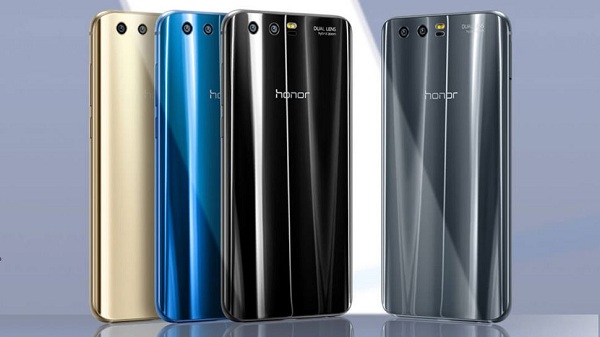
huawei-honor9
The OnePlus 5 runs Android 7.1.1 and is powered by a 3300mAh non removable battery. It measures 154.20 x 74.10 x 7.25 (height x width x thickness) and weigh 153.00 grams. It is a dual SIM (GSM and GSM) smartphone that accepts Nano-SIM and Nano-SIM. Connectivity options include Wi-Fi, GPS, Bluetooth, NFC, USB OTG, 3G and 4G (with support for Band 40 used by some LTE networks in India). Sensors on the phone include Compass Magnetometer, Proximity sensor, Accelerometer, Ambient light sensor and Gyroscope.
oneplus-5-colors

Play iTunes Movies on Honor 9 and OnePlus 5

Honor 9 and OnePlus 5 are the best android phone you can choose of 2017.  And you can switch your iPhone to Honor 9 or OnePlus 5. By the way, you may have a lot of iTunes movies or TV Shows and want to play them on your Android phone such as Huawei Honor 9 or OnePlus 5.
As we all know, movies you purchase or rent from iTunes are M4V formats with DRM protection, which prevent you playing on other non-Apple devices. To play iTunes movies on Honor 9 or OnePlus 5, you should remove DRM firstly.

Remove DRM and Play iTunes Movies With M4V Converter Plus

M4V Converter Plus is recommended for you. It is one of the best iTunes DRM removal software and get rid of Apple DRM protection legally.
Besides, it is also an all-in-one iTunes Movies Converter. With it, you can easily convert any iTunes movies to plain MP4, 3PG, WMV, FLV, AVI and other video files supported by Android phones with 30X faster conversion speed. And the 5.1 Audio Track and Subtitles are kept.
M4V Converter Plus is compatible with Mac and Windows platforms. You can download the program by clicking the links below as you need.
********************************************************************************
Free Download M4V Converter Plus for Mac
Download M4V Converter Plus for Win here
********************************************************************************

Step by Step Guide of Converting iTunes Movies 

Step 1. Install and Launch the program on your computer. iTunes will be opened automatically.
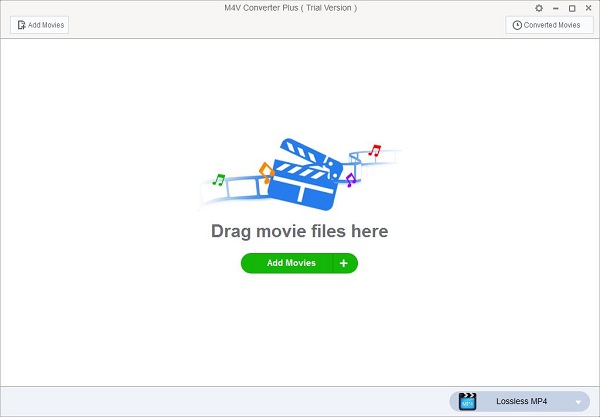
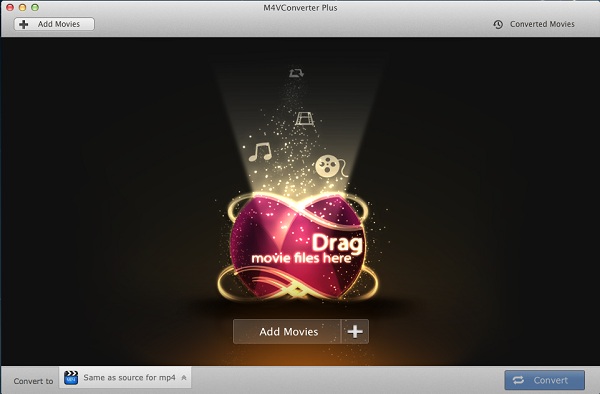
Interface of M4V Converter Plus for Mac
interface
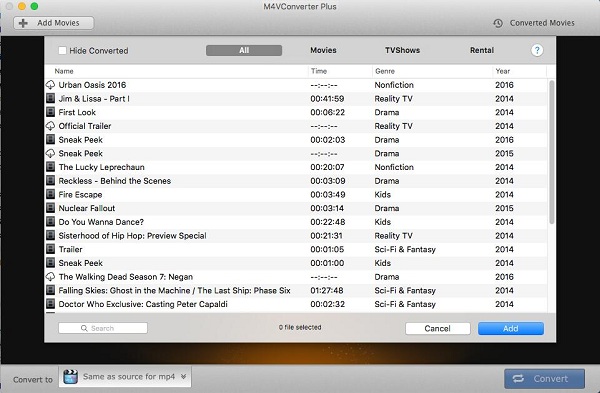
Step 2. Import movies you want to watch to the program by clicking Add Movies button.
add-tv-shows
add
Note: M4V Converter Plus support converting any iTunes videos, including iTunes purchased movies, Rentals, TV Shows, iTunes Extras (Mac), iCloud and music videos.
Step 3. After the movies added, you can set output format.  Here we can select MP4 as output format. Because MP4 is the best video format for Android phone.
For Mac users, click Convert to profile list to choose Same as source for mp4 as output format.
mp4-output
For Windows user, Lossless MP4 is the default output format on the blue Profile panel.
add
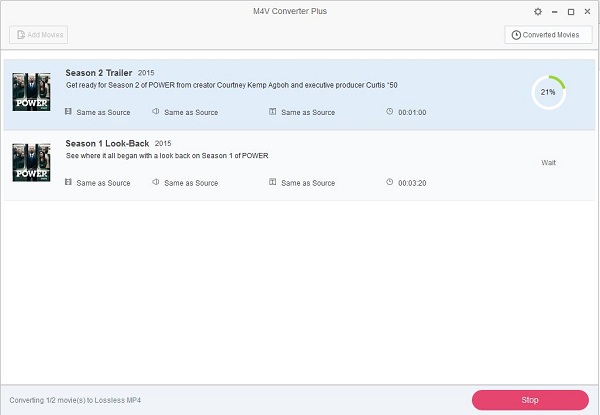
Step 4. Start the iTunes movies to MP4 conversion.
To begin the conversion, Mac users can click Convert button, and Windows users should click the blue profile panel again.

Related Topics:

Convert and Transfer iTunes M4V videos to Huawei Honor 9 for watching
To Play iTunes movies or TV shows on OnePlus 5
How to Convert iTunes Videos to Samsung Galaxy Note
How to Transfer iTunes Movies to Samsung Galaxy S8 and S8 Plus

2017年5月27日星期六

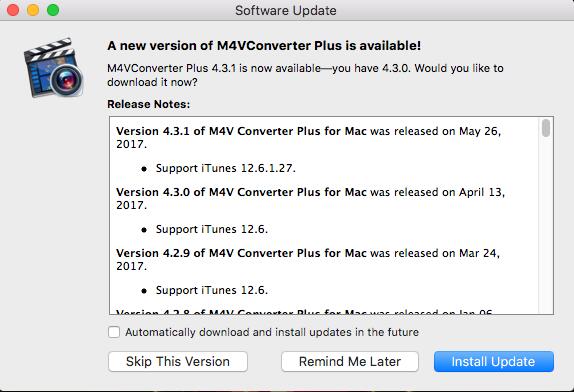
M4V Converter Plus for Mac Updated to v4.3.1 to support iTunes 12.6.1.27

M4V Converter Plus for Mac was released a new version on May 26, 2017, which support iTunes latest version 12.6.1.27.
The latest version 4.3.1 now fully supports iTunes 12.6.1.27, but only doesn't supports iTunes 12.6.1.25. So if you are still running iTunes 12.6.1.25, please update your iTunes to 12.6.1.27 through: https://www.theiphonewiki.com/wiki/ITunes, and then download and install the new version of M4V Converter Plus for Mac.

Brief review of M4V Converter Plus for Mac new version  4.3.1

Alongside the release of a new iTunes 12.6.1 that brings the new releasing note “minor app and performance improvements”, M4V Converter Plus Inc. has launched its new version of M4V Converter Plus for Mac.
Ever since upgrading to iTunes v.12.6.1.25, most Mac users, especially those who are running OS X 10.11, macOS 10.12 or later, would encounter the problem that M4V Converter Plus for Mac can’t work well with the new iTunes. To fix the issue, MCP Inc. developing team are working hard to fix the incompatibility issue and spent one week or two to work it out.
 mcp-mac-4.3.1
New version 4.3.1 of M4V Converter Plus for Mac is now available for download along with new features. It support the latest version of iTunes 12.6.1. 27 on OS X 10.11 EI Capitan and 10.12 Sierra.
Now users can download iTunes 12.6.1.27, and M4V Converter Plus for Mac 4.3.1 can convert iTunes video files successfully with the latest iTunes installed.

 M4V Converter Plus for Mac Overview

M4V Converter Plus for Mac can legally remove DRM from iTunes M4V videos and easily convert M4V to unprotected MP4, MOV, AVI, FLV, WMV, MP3, WAV, etc. It can also provide various output preset, including Samsung Galaxy S8, iPhone 7, HTC 10, LG G6, Huawei P10, PS4, Xbox One, etc.
What’s more, you can convert iTunes purchased movies, Rentals, TV Shows and music videos at 30X faster speed as well as high output quality.
It can compatible with Mac OS X 10.8, 10.9, 10.10 OS X 10.11 EI Capitan and 10.12 Sierra perfectly. 
Pricing and Availability
M4V Converter Plus for Mac is currently available for $44.95 from MCP Inc. official website.Version 4.3.1 is free upgrade to current users. A free trial version is available for users to use before they purchase. To learn more or download M4V Converter Plus for Mac, please visit http://m4vconverterplus.com/.
Please kindly note that M4V Converter Plus for Mac doesn't work properly with iTunes 12.6.1.25 yet. If you are still using that specific iTunes version, please simply download and install the latest v.12.6.1.27 from: https://www.theiphonewiki.com/wiki/ITunes and try the new version 4.3.1 again.

2017年5月24日星期三

Roger Moore, Who Played James Bond 007 Times, Dies at 89

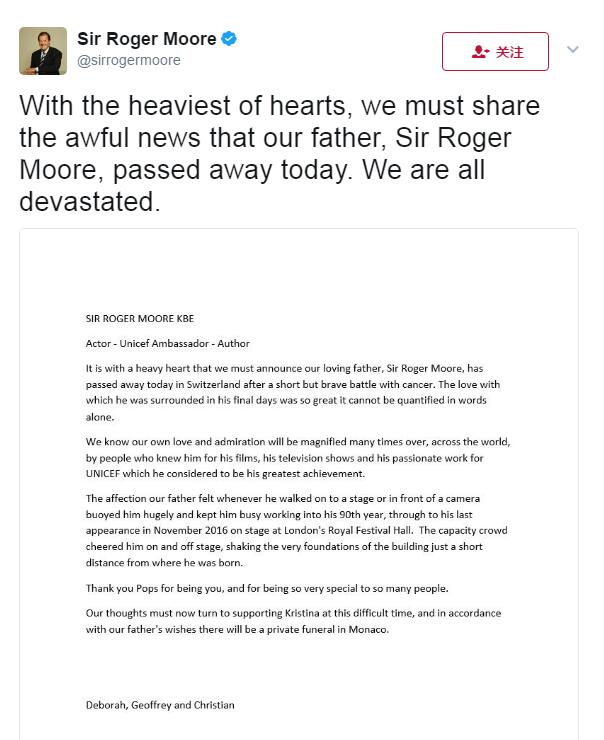
Sir Roger Moore has sadly passed away at the age of 89.
The former James Bond star died after "a short but brave battle with cancer", his three children Deborah, Geoffrey and Christian announced in a statement.
"It is with a heavy heart that we must announce our loving father, Sir Roger Moore, has passed away today in Switzerland after a short but brave battle with cancer. The love with which he was surrounded in his final days was so great it cannot be quantified with words alone," they said.
roger-moore-died

Roger George Moore and James Bond

Sir Roger George Moore KBE (14 October 1927 – 23 May 2017) was an English actor. He played the British secret agent James Bond in seven feature films between 1973 and 1985. He is also known for playing Simon Templar in the television series The Saint between 1962 and 1969.
roger-moore
Moore took over the role of Bond from Sean Connery in 1972, and made his first appearance as 007 in Live and Let Die (1973). The longest serving Bond to date, Moore portrayed the spy in six more films. Appointed a UNICEF Goodwill Ambassador in 1991, Moore was knighted by Queen Elizabeth II in 2003 for "services to charity".
Roger_Moore-James-Bond-Films

Roger George Moore James Bond era (1973–1985)

After George Lazenby was cast in 1969's On Her Majesty's Secret Service and Connery played Bond again in Diamonds Are Forever (1971), Moore did not consider the possibility until it seemed abundantly clear that Connery had in fact stepped down as Bond for good. At that point Moore was approached, and he accepted producer Albert Broccoli's offer in August 1972. In his autobiography Moore writes that he had to cut his hair and lose weight for the role. Although he resented having to make those changes, he was finally cast as James Bond in Live and Let Die (1973).
roger-moore-obit-njs
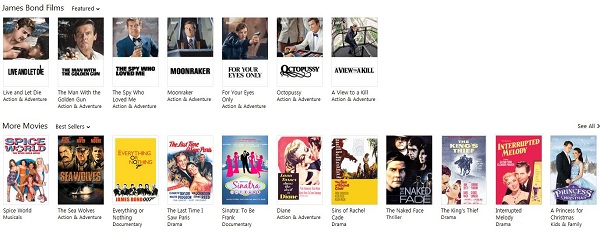
After Live and Let Die, Moore continued to portray Bond in The Man with the Golden Gun (1974); The Spy Who Loved Me (1977); Moonraker (1979); For Your Eyes Only (1981); Octopussy (1983); and A View to a Kill (1985). Moore was the oldest actor to have played Bond – he was 45 in Live and Let Die (1973), and 58 when he announced his retirement on 3 December 1985.

Recommendation: Play iTunes Movies freely with M4V Converter Plus

In memory of Roger George Moore, you can purchase all his hit movies from iTunes Store. 
roger-moore-movies
And with M4V Converter Plus, you can strip DRM from iTunes purchased movies and convert M4V files to unprotected MP4, MOV, AVI, FLV, WMV, MP3 or other plain formats. 
It  can also provide several output preset, like iPhone 7, Samsung Galaxy S8Moto G5 Plus, Sony PS4, Xbox 360, Xbox one, Samsung Smart TV, iPad, Apple TV and so on. M4V Converter Plus can support iTunes Rentals, which can allow you to play iTunes rented movies forever. 

2017年5月10日星期三

How to Play iTunes Movies on Galaxy Note 5

Samsung Galaxy Note 5 Android smartphone. Announced 2015, August. Features 3G, 5.7″ Super AMOLED capacitive touchscreen, 16 MP camera, Wi-Fi, GPS.
galaxy-note-5
The following video formats are readable by the Samsung Galaxy Note 5:
  • Video formats: 3gp, flv, mkv,mp4, avi and wmv
  • Codecs: MPEG4, H.264, VC-1, DivX/XviD, H.263, Sorenson H.263.
We can learn above, Samsung Galaxy Note 5 support playing videos in 3GP, FLV, MP4, AVI and WMV formats. And iTunes movies you purchased or rented are M4V files with DRM protection. So if you want to play iTunes movies on Note 5, you should convert iTunes movies to the formats supported by Galaxy Note 5 firstly.

Remove DRM and Convert iTunes Movies With M4V Converter Plus

M4V Converter Plus is one of the best iTunes DRM removal software. It can enable you to get rid of Apple DRM protection legally.
It is also a powerful iTunes to Galaxy Note 5 Converter. With it, you can easily convert iTunes M4V videos to plain MP4, 3PG, WMV, FLV, AVI and other video files supported by Note 5. 
You can get the converted iTunes movies with 30X faster conversion speed. And the 5.1 Audio Track and Subtitles are kept. M4V Converter Plus is compatible with Mac and Windows platforms. You can download the program by clicking the links below as you need. 
******************************************************************
*****************************************************************

Step by Step Guide of Converting iTunes Movies to Galaxy Note 5

Step 1. Install and Launch the program on your computer. iTunes will be opened automatically.
Interface of M4V Converter Plus for Mac
interface
Step 2. Import movies you want to watch to the program by clicking Add Movies button.
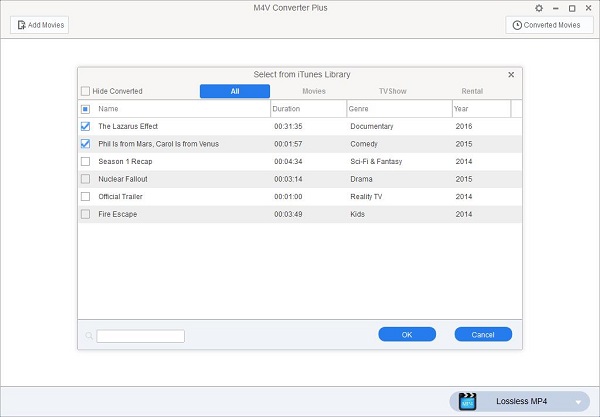
add-tv-shows
add
Note: M4V Converter Plus support converting any iTunes videos, including iTunes purchased movies, Rentals, TV Shows, iTunes Extras (Mac), iCloud and music videos. 
Step 3. After the movies added, you can choose a suitable for your Note 5.  Take MP4 for example.
For Mac users, click on Convert to profile list to choose Same as source for mp4 as output format.
mp4-output
For Windows user, Lossless MP4 is the default output format. 
add
Step 4. Start the iTunes movies to Galaxy Note 5 conversion.
To begin the conversion, Mac users can click Convert button, and Windows users should click the blue profile panel again. 

Related Topics:

2017年5月4日星期四

Guardians of the Galaxy Vol. 2 Review

The Marvel sequel reveals an all-powerful character that could send shock waves through the entire Avengers franchise.
guardians-of-the-galaxy-vol-2
Guardians of the Galaxy Vol. 2 is a 2017 American superhero film based on the Marvel Comics superhero team Guardians of the Galaxy, produced by Marvel Studios and distributed by Walt Disney Studios Motion Pictures. It is the sequel to 2014's Guardians of the Galaxy and the fifteenth film in the Marvel Cinematic Universe.
Guardians of the Galaxy Vol. 2 premiered in United States on May 5, 2017, in 3D and IMAX 3D.

Guardians of the Galaxy Vol. 2 Review

Guardians of the Galaxy Vol. 2 doubles-down on everything that audiences loved about its predecessor, to still-entertaining but diminished returns.
The galaxy isn’t big enough to contain the meandering plot, which sends the hero, Chris Pratt’s Peter Quill, on a quest to discover his identity.
Like many a sequel to a slam-bang, much-liked mega-hit, Guardians of the Galaxy Vol. 2 isn't quite as much fun, not quite as clever, not quite as fresh as the original - but it still packs a bright and shiny and sweet punch.
The soundtrack has bigger hits, Groot is an even bigger scene-stealer, and the villain problem has been solved. But it's all a means to the heart of the story: Family. And not that Fast & Furious nonsense either.
It's a movie that shows the confidence of a blockbuster that knows what it has to do to earn the adoration of its audience.
Guardians-of-the-Galaxy-Vol-2
It hurtles past at dizzying speed with a slew of new characters, soap opera-like motivations and confrontations, and goofy-ridiculous adventures, tasking audiences to keep up with it all.
Often loud, occasionally obnoxious and so consistently convinced of its own awesomeness that it will not, it cannot, stop pointing out everything that makes it so utterly wonderful.

Watch iTunes movies Guardians of the Galaxy freely 

The movie Guardians of the Galaxy Vol. 2 is showing in cinemas now. And to know the film better, you can watch the prequel Guardians of the Galaxy at first.
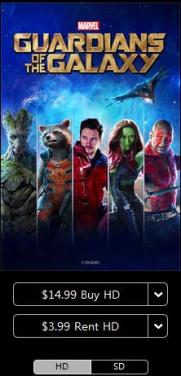
You can purchase or rent Guardians of the Galaxy film from iTunes Store. 
Guardians-of-the-Galaxy

Guardians of the Galaxy Movie Plot

Guardians-of-the-Galaxy-1
An action-packed, epic space adventure, Marvel’s “Guardians of the Galaxy” expands the Marvel Cinematic Universe into the cosmos, where brash adventurer Peter Quill finds himself the object of an unrelenting bounty hunt after stealing a mysterious orb coveted by Ronan, a powerful villain with ambitions that threaten the entire universe.
To evade the ever-persistent Ronan, Quill is forced into an uneasy truce with a quartet of disparate misfits—Rocket, a gun-toting raccoon, Groot, a tree-like humanoid, the deadly and enigmatic Gamora and the revenge-driven Drax the Destroyer. But when Quill discovers the true power of the orb and the menace it poses to the cosmos, he must do his best to rally his ragtag rivals for a last, desperate stand—with the galaxy’s fate in the balance.
You can click the Buy or Rent button to get the movie. After you paid it, you can play it on iPhone, iPad, Apple TV and other Apple devices.

Play iTunes Purchased or Rented movie Guardians of the Galaxy freely

M4V Converter Plus is a powerful DRM media Converter as well as iTunes DRM removal software. With it, you can legally strip Apple Fairplay DRM protection from iTunes M4V videos and convert them to unprotected  video like MP4, MOV, AVI, SWF, FLV, WMV, etc.
M4V Converter Plus can work on Mac and Windows platforms. Besides, it can support converting any iTunes videos, including iTunes purchased movies, Rentals, TV Shows, music videos and i Cloud files. Here the easy steps you can follow. 
Step 1. Download M4V Converter Plus (for Mac and for Windows) on your computer. Install and run it, you can find the easy user interface.
interface1
M4V Converter Plus for Mac
interface
M4V Converter Plus for Win
Step 2. Import Guardians of the Galaxy movie to the program by clicking Add Movies button. And you can also drag and drop the movie to the main window directly. 
Note: Please make sure you are running the latest version of M4V Converter Plus and iTunes.
add-icloud
support-icloud-movie
Step 3. Choose a suitable output format according to the devices you have. MP4 is the best format you can choose. 
1> For Mac users, you can click Convert to profile to choose Same as source for mp4.
mp4-output
Enter a caption
2> For Windows users, Lossless MP4 is the default output format for you.
Note. M4V Converter Plus provides many popular output device presets for you. Such as iPhone 7, iPad, Apple TV, Galaxy S7,  PS3,  Xbox, Google Nexus and so on. 
mp4-output
Step 4. Start the iTunes movies to Mp4 conversion progress.

Recommendation: Apple Music Converter - Macsome iTunes Converter 

"Hooked on a Feeling", "Go All the Way",  "Spirit in the Sky",  "I Want You Back" and other wonderful Guardians of the Galaxy movie Original Motion Picture Soundtracks can be enjoyed on the iTunes store.
And with Macsome Apple music Converter, you can convert iTunes music library to common MP3, so that you can play Apple music on standard MP3 players easily. 

2017年4月25日星期二

The top 10 movies on the iTunes Store

iTunes Movies U.S. charts for April 26, 2017:

iTunes Movies US Charts:
1. Fifty Shades Darker
2. Split (2017)

3. The Founder
4. La La Land
5. Hidden Fingures
6. Rogue One: A Star Wars Story
7. Underworld: Blood Wars
8. Moana (2016)

9. A Dog's Purpose
10. Lion
As we all know, iTunes movies are all in M4V format with DRM copyright restrictions, which prevent users playing or transferring iTunes movie purchases and rentals on their android devices freely. Generally speaking, android devices can support multiple files like MP4, 3GP, Divx, F4V, MPEG, MOV, etc, not including M4V format. So what we should do to convert M4V to android devices.
Go to try M4V Converter Plus. With it, you can remove Apple DRM protection from iTunes movie Purchases and Rentals legally by converting iTunes videos to MP4, MOV, 3PG, MPEG for playing on android devices easily. With the help of M4V Converter Plus, you can play iTunes movies and TV shows on android device at will.
Step 1: Free download the M4V to android converter, install and launch it.
M4V Converter Plus can support both windows and Mac version. Click Add Movies button to import iTunes videos to the program.
add-rentals
Step 2: Choose output format for your android device.
avi-output
Step 3: When all the settings done, you can click profile blue box to start the M4V to android devices conversion.

Recommend

Want to enjoy your iTunes music files on your android tablets? Macsome iTunes Music Converter can help you. With it, you can remove DRM protection and convert iTunes music to plain MP3, AAC, etc. In this way, you can transfer apple music to Samsung galaxy S8, HTC 10, LG G6, Nexus P6 easily. Learn more.
Spotify Music to MP3 Converter is another DRM music software recommended for you. It allows you to decrypt and convert Spotify song or playlist to MP3, AAC, WAV and FLAC. With it, you can download Spotify music with high quality. And then you can play Spotify music anytime and anywhere. Learn more.

2017年3月20日星期一

Motorola Moto G5 Plus vs Moto G4 Plus, Play iTunes movies on Moto G Plus (5th gen.)

Moto G5 Plus vs. Moto G4 Plus

Moto G5 PlusMoto G4 Plus
Operating SystemAndroid 7.0 NougatAndroid 6.0.1, Android 7.0 Nougat (in some markets)
Display5.2-inch 1080p (1920x1080) IPS LCD panel,424ppi pixel density5.5-inch 1080p (1920x1080) IPS LCD panel,401ppi pixel density
SoCOcta-core Qualcomm Snapdragon 625, Eight Cortex A53 cores at 2.0GHz, 14nmOcta-core Qualcomm Snapdragon 617, Four Cortex A53 cores at 1.5GHz, Four Cortex A53 cores at 1.2GHz, 28nm
GPUAdreno 506Adreno 405
RAM2GB/4GB RAM2GB/4GB RAM
Storage32GB/64GB storage
microSD slot up to 256GB
16GB/32GB storage
microSD slot up to 256GB
Rear camera12MP f/1.7 lens, dual LED flash, PDAF, 4K video recording16MP f/2.0 lens, dual LED flash, PDAF
Front shooter5MP
1080p video recording
5MP
1080p video recording
ConnectivityWi-Fi 802.11b/g/n, Bluetooth 4.2 (A2DP), GPS,
microUSB, 3.5mm audio jack
Wi-Fi 802.11a/b/g/n, Bluetooth 4.1 (A2DP), GPS,
microUSB, 3.5mm audio jack
Battery3000mAh battery3000mAh battery
FingerprintFront fingerprint sensorFront fingerprint sensor
Dimensions150.2 x 74 x 7.7mm153 x 76.6 x 9.8mm
Weight155g155g
ColorsGrey, GoldBlack, White

Motorola Moto G5 Plus Review

Motorola Moto G5 Plus smartphone was launched in February 2017. The phone comes with a 5.20-inch touchscreen display with a resolution of 1080 pixels by 1920 pixels at a PPI of 424 pixels per inch. Motorola Moto G5 Plus price in India starts from Rs. 16,999.
The Motorola Moto G5 Plus is powered by 2GHz octa-core Qualcomm Snapdragon 625 processor and it comes with 4GB of RAM. The phone packs 32GB of internal storage that can be expanded up to 128GB via a microSD card. As far as the cameras are concerned, the Motorola Moto G5 Plus packs a 12-megapixel primary camera on the rear and a 5-megapixel front shooter for selfies.
Motorola-Moto-G5-Plus-2017
The Motorola Moto G5 Plus runs Android 7.0 and is powered by a 3000mAh non removable battery. It measures 150.20 x 74.00 x 9.70 (height x width x thickness) and weigh 155.00 grams.
The Motorola Moto G5 Plus is a dual SIM (GSM and GSM) smartphone that accepts Nano-SIM and Nano-SIM. Connectivity options include Wi-Fi, GPS, Bluetooth, NFC, USB OTG, FM, 3G and 4G (with support for Band 40 used by some LTE networks in India). Sensors on the phone include Proximity sensor, Accelerometer, Ambient light sensor and Gyroscope.

Referred Reading: Play iTunes movies on Moto G5 Plus

Generally speaking, iTunes movies we purchased or rent are M4V files with Apple DRM protection. Due to DRM, you can only play iTunes movies on iPhone, iPad, iPod and other Apple devices.
If you want to play iTunes movies on Moto G5 Plus, you should remove DRM protection from iTunes movies and convert M4V to the format Moto G5 Plus supported.

Moto G5 Plus support video formats:

  • MPEG4 + AAC: video up to 296 Kbps, 320 x 240, 15 fps., 44 kHz, stereo audio in .mp4, 3gp, .pvs, .pvp, .pvx file formats
  • H.263 + AAC: video up to 296 Kbps, 320 x 240, 15 fps., 44 kHz, stereo audio in .mp4, 3gp, .pvs, .pvp, .pvx file formats
  • Real Audio + video: video up to 296 Kbps, 320 x 240, 15fps., 44 kHz, stereo audio in .rm, .rmvb file formats

Moto G5 Plus support audio formats:

  • AAC (up to 192 Kbps)
  • AAC+ (16 to 128 Kbps)
  • MP3 (up to 320 Kbps)
  • WAV (no limit)
  • WMA v9 L2, v3, v7, v8 (up to 160 Kbps)
  • Real Audio G2, 8 (up to 96 Kbps)
  • Real Audio 10 (up to 192 Kbps)
M4V Converter Plus is a professional iTunes Movie ConverterWith it, you can legally strip DRM from any iTunes videos, including iTunes purchased movies, iTunes Rentals, TV Shows and music videos. It can also convert the protected M4V files to unprotected MP4, AVI, FLV, AVI, MOV, WMV, etc.
It can also allow you to extract MP3, AAC, FLAC, WMA audio from iTunes videos with high conversion speed and output quality. It can work well on Mac and Windows platforms with the latest iTunes installed.
You can click Add Movie button to import iTunes videos to the program. And you can go to profile panel to set output format for your Moto G Plus.
M4V Converter Plus support output formats:
Convert DRM M4V to MP4, M4V to MOV, AVI, VOB, WMV
Extract M4V to MP3, AAC, WMA, M4A, MP2, M4R, etc.
Users can play iTunes DRM-ed M4V videos on various devices like iPhone SE, iPhone 7, iPhone 6S plus, Samsung Galaxy S7, Google Nexus, Xbox 360, PS4, Xbox One, LG G6,  etc.
After all settings done, you can Start the iTunes movies to Moto G5 Plus conversion.

2016年6月28日星期二

Top 10 Movies You Should Not Miss from iTunes June 2016

Apple have the biggest catalog of music and video offerings, more than 28 million songs, around 50,000 movies are available for purchase or rent.
Looking for some good movies to download, below is the top 10 best movies on iTunes to purchase or rent in June 2016.
itunes-top-movies
Top 1. Zootopia
In a city of anthropomorphic animals, a rookie bunny cop and a cynical con artist fox must work together to uncover a conspiracy.
A Portokalos family secret brings the beloved characters back together for an even bigger and Greeker wedding.
In London for the Prime Minister's funeral, Mike Banning discovers a plot to assassinate all the attending world leaders.
After getting in a car accident, a woman is held in a shelter with two men, who claim the outside world is affected by a widespread chemical attack.
The aliens are coming and their goal is to invade and destroy Earth. Fighting superior technology, mankind's best weapon is the will to survive.
itunes-top-movies2
In this exciting third film in The Divergent Series, Tris and Four lead a team of rebels in a daring escape over the city wall—into a strange new world where they face a threat more dangerous than they ever imagined. Together, Tris and Four wage a furious battle for survival, fighting not only for their factions and loved ones, but for the future of an entire city in this dynamic, action-packed adventure.
During an attack on a U.S. compound in Libya, a security team struggles to make sense out of the chaos.
Top 8. Carol
An aspiring photographer develops an intimate relationship with an older woman.
Top 9. Deadpool
A former Special Forces operative turned mercenary is subjected to a rogue experiment that leaves him with accelerated healing powers, adopting the alter ego Deadpool.
Fearing that the actions of Superman are left unchecked, Batman takes on the Man of Steel, while the world wrestles with what kind of a hero it really needs.

How to Play iTunes movies Purchases or Rentals freely 

If you have purchased or rented the movies from iTunes store, you can play them on iPhone, iPad, Apple TV and other apple devices. To play iTunes purchased or rented movies freely, M4V Converter Plus can help you.
Step 1. Free download M4V Converter Plus (This guide we will use Windows version, you can find Mac version here), install and open it. The intuitive user interface shown as below.
interface
Note: The program you opened is a trial version, which support you converting one minute for a file. You can purchase the full version by clicking the following link http://m4vconverterplus.com/order-win.html .
Step 2. Click Add Movies button to import iTunes movies you bought or rented. Then press OK.
add
Step 3. You can set output format from the profile drop-down list.
android-preset
Note: Lossless MP4 is the default format. Because MP4 is the common format for almost players. You can select other video formats like AVI, WMV, MPEG-1, FLV, VOB, etc.
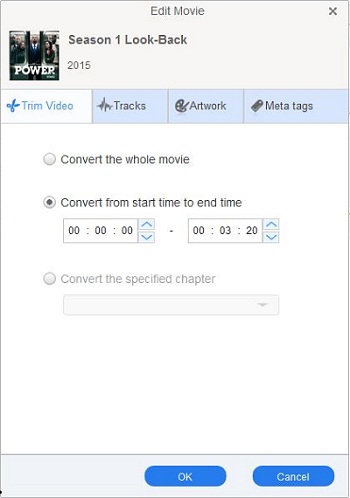
(Optional step) The program also allows you to extract audio from iTunes videos and save as MP3, WMA, AAC, FLAC, etc. So you can trim the video to get the specific segments you want. In this way, you can customize ringtone from movie soundtrack as your like.
clip
Step 4. Click profile panel to start the conversion.
converting
Few minutes later, you will find target files in the Converted Movies folder. Now you can play the converted files at will.