2017年4月5日星期三

Samsung Galaxy S8 Vs iPhone 7: What's The Difference?

Apple will radically redesign the iPhone later this year, but for the bulk of 2017 the biggest smartphone rivalry will be between the iPhone 7 and Samsung’s new Galaxy S8. But what are the key differences between them and which makes for the better upgrade? It’s not as simple as you might think. (This article is posted at Forbes by Gordon Kelly )

Displays - Samsung’s Stunning Win

Look closely at the iPhone 7 and Galaxy S8 and you’ll find they are competitively matched in many areas, but displays is not one of them:
  • Galaxy S8 - 5.8-inch Super AMOLED, 1440 x 2960 pixels (570 ppi pixel density), 83.6% screen-to-body ratio, Corning Gorilla Glass 5
  • iPhone 7 - 4.7-inch LED-backlit IPS LCD, 1334 x 750 pixels (326 ppi), 65.6% screen-to-body ratio
samsung-iphone
Samsung Galaxy S8 vs iPhone 7
It’s 5.8-inch OLED display is simply stunning, it fills almost the entire front of the phone (compared to the limp 65.6% of the iPhone 7) and it is sharper, brighter and offers more contrast than Apple’s handset. The Galaxy S8 is also the first smartphone to attain Mobile HDR Premium certification, making a truly stunning device for video on the move.

It is worth pointing out the Galaxy S8 ‘only’ defaults to 2220 x 1080 pixels by default to save battery life (a key concern, more later) but that’s still miles ahead of the iPhone 7 and another reason Apple is finally expected to produce an OLED iPhone later this year. It’s simply a better technology.
iPhone 7 wins? The only potential plus point here is the iPhone’s flat display. The Galaxy S8 has a dual curved display which Samsung smugly called the ‘Infinity Display’ and not everyone likes curved panels because they can register a lot of accidental touches.

Design - Smartphone Future Vs Smartphone Past

And here is the Galaxy S8’s second big win and it is where the screen-to-body ratio shines because, despite how huge Samsung’s screen is, the smartphone is not much bigger or heavier:
  • Galaxy S8 - 148.9 x 68.1 x 8.0 mm ( 5.86 x 2.68 x 0.31-inch), 155g (5.36 oz)
  • iPhone 7 - 138.3 x 67.1 x 7.1 mm (5.44 x 2.64 x 0.28 in) and 138 g (4.87 oz)
samsung-vs-iphone

This aside, however, the iPhone 7 does have some design advantages. It’s aluminium back is more durable than the Galaxy S8’s glass (though the latter is there to offer wireless charging) and you can easily unlock with your fingerprint face down on the table. This long running functionality has gone from the Galaxy S8 as its screen is too big to fit the sensor and Samsung’s solution is ridiculous.
The Galaxy S8 fits the fingerprint sensor on the back (which is fine), but positions it high up beside the camera so you smudge the lens every time you unlock the phone (uncool). Samsung even has added software props to warn users about this.
The Galaxy S8 strikes back though as it has both iris (fast and secure) and facial (fast and insecure) recognition. You’ll have to point the phone at your face for this to work, which is a little conspicuous, but it’s undeniably cool and something Apple is expected to copy sooner rather than later.
galaxy-s8-camera
Elsewhere the Galaxy S8 also has the benefit of a microSD slot supporting up to 256GB of storage expansion, a 3.5mm headphone jack and it has higher IP68 water and dust resistance compared to IP67 certification on the iPhone 7 (both allow full submersion for up to 30 minutes in water, but IP68 is in up to 1.5 metres while IP67 is in one metre).

Cameras - Samsung Leads But Stagnates

Two years ago Samsung snatched the smartphone camera crown from Apple and you will get marginally better photos from the Galaxy S8 than the iPhone 7. But the reason for this is disappointing: the Galaxy S8 uses the same main camera hardware as the Galaxy S7 which edged out Apple’s phone.
Samsung does make software improvements (new multi-shot processing combines several images to create each shot), but early tests suggest it won’t surpass current smartphone camera champion the Google Pixel XL (sample below) and it opens the door for Apple to also surpass it with the iPhone 8 later this year.
galaxy-s8-google-pixel-xl
Galaxy S8 vs Google Pixel XL

Where the match is closer, is the front facing camera. The Galaxy S8 has an 8MP module with a fast f/1.7 aperture compared to the iPhone 7’s 5MP module with slower f/2.2 aperture. But this isn’t the big win Samsung has been enjoying since the Galaxy S6.

Performance - Samsung Continues To Self Sabotage

If you have noticed coverage of the Galaxy S8, you’ll have heard about its party trick: it can turn into a barebones desktop computer if you purchase the optional $150 Samsung DeX dock. This connects to a monitor via HDMI and keyboard and mouse from USB. In this mode it runs a hacked version of Android with a desktop UI and support for Android apps, Citrix Receiver and Amazon Workspaces.
galaxy-s8_performance_new_pd
It’s clever and could be a hit with businesses looking to save costs, but for consumers this is unlikely to remain their main PC. Furthermore when you look purely at mobile software, Samsung continues to use TouchWiz to take everything great we saw about stock Android on the Google Pixel and tear it away or needlessly duplicate it (Bixby < Google Assistant / Siri; Connect < Google Home/Apple Home).
Then there’s the two app stores, two calculators, two web browsers, two mobile payment services, two clocks, etc. It’s pointless. Meanwhile the Galaxy S8 won’t even ship with an up to date version of Android. Android 7.0 comes out the box, while Android 7.1 is nearly six months old. This is why the stereotypes around Samsung software exist: because they are true.
  • Galaxy S8 (US) - Qualcomm Snapdragon 835 octa-core chipset (4x 2.35GHz and 4x 1.9GHz Kryo CPUs), Adreno 540 GPU; 4GB of RAM
  • Galaxy S8 (Europe and Asia) - Exynos 8895 (4x 2.3 GHz & 4x 1.7 GHz CPUs), ARM Mali-G71 MP20 GPU; 4GB of RAM
  • iPhone 7 - Apple A10 Fusion chipset: Quad Core CPU, Six Core GPU, 2GB of RAM

Yes, I still found the Galaxy S8 retains the customary stutters and drops frames of animation navigation the UI and, no matter how close benchmarks claim the Snapdragon 835 (US) and Exynos 8895 (International) versions are, it simply doesn’t come close to matching the smooth responsiveness of iOS on the iPhone 7.
You will get connectivity benefits on the Galaxy S8 such as Bluetooth 5.0 (2x speed, 4x range of Bluetooth 4.2) and LTE (4G) speeds up to one gigabit, but these are standards for the future rather than something you’ll be able to take advantage of right now.

Battery Life - Questions All Round

Last year Samsung did an exceptional job with the Galaxy S7 highlighting how stagnant Apple has been with its three generations of 4.7-inch iPhone. But this year it is Samsung which looks set to have taken a step back.
On paper Samsung should have the win (3000 mAh vs 1960 mAh), but iOS has always gotten away with smaller capacity batteries. Meanwhile the Galaxy S8 retains the same capacity as the Galaxy S7 despite its successor increasing display size (the biggest battery draw) by a massive 0.7-inches. It’s going to be a miracle if the Galaxy S8 remains anywhere close to the Galaxy S7’s staying power.
That said I still expect it to edge past the iPhone 7 (the iPhone Plus models have always been the battery life kings), but Samsung has missed an opportunity here to cement its lead.
galaxy-s8-large-battery
Then again when it comes to charging, the Galaxy S8 batters the iPhone 7. Its quick charge technology can deliver up to 50% charge in 15 minutes and a full charge in an hour. Even using an iPad charger, an iPhone 7 cannot get near this. Then there’s the Galaxy S8’s wireless charging which is still faster than an iPhone 7 with its standard wired charger.
Apple has been asleep at the wheel for several years here and it needs to change. Happily it just might…
But will the Galaxy S8 explode? It shouldn’t. Samsung has a new ‘8 Point Quality Check’ which is class leading and improved cycle longevity means it will lose just 5% capacity after one year. Rivals typically drop 15-20%. There’s also USB Type-C charging, which Apple really should adopt if it is going to continue fittings its MacBooks with Type-C but no Lighting port.

Price And Storage - Increases All Round

If you’re still struggling to decide between these two phones, then their difference in price is not going to help you:
  • Galaxy S8 - 64GB - $750 / €799 / £689
  • iPhone 7 - 32GB ($649), 128GB ($749) and 256GB ($849)

The Galaxy S8 is $100 more expensive than the launch price of the Galaxy S7 which makes the 128GB iPhone 7 look a potentially better deal. But don’t forget the Galaxy S8’s expandable storage. You’ll also get a premium pair of AKG headphones bundled (worth $99) which are far superior to Apple’s awful wired earphones.
The Galaxy S8 is a stunningly beautiful smartphone that is leagues ahead of the iPhone 7, but Samsung's software remains a let down and means the iPhone 7 is still the smoother, faster handset to use Gordon Kelly
The Galaxy S8 is a stunningly beautiful smartphone that is leagues ahead of the iPhone 7, but Samsung's software remains a let down and means the iPhone 7 is still the smoother, faster handset to use.  

Related Topics 

2017年3月31日星期五

Fast and Furious 8 is coming soon: best film you ever saw

Fast and Furious 8 early screening reactions: 'Another winning entry'. It seems like fans have more of the high-octane same in store.
The first reactions to Fast and Furious 8 have begun to trickle in following a surprise screening of the film at Cinema-con.
Vin Diesel, who plays Dominic Toretto in the series, introduced the premiere to excited exhibitors gathered at the release slate event in Las Vegas.
the-fate-of-the-furious8
Fortunately for fans of the long-running franchise - which began in 2001 with The Fast and the Furious - it seems like this eighth film will be more of the mindlessly high-octane same.
The film reunites much of the cast that has been accumulated over the past 16 years, including Vin Diesel, Michelle Rodriguez, Tyrese Gibson, Dwayne 'The Rock' Johnson and Jason Statham. New additions arrive in the form of a villainous Charlize Theron and Helen Mirren, who may or may not play a character we know's mother.


It's been reported that, following on from last year's 'beef' between Diesel and Johnson, the actors are being kept apart on the film's press tour which is currently in full force.
Other films to have received previews at CinemaCon include Pirates of the Caribbean 5, The Dark Tower and new Christopher Nolan film Dunkirk which is said to have received the event's biggest standing ovation.
Check back here to see our verdict on the film as soon as the embargo lifts next week. Fast and Furious 8 is released in the UK on 12 April and USA on 14 April.

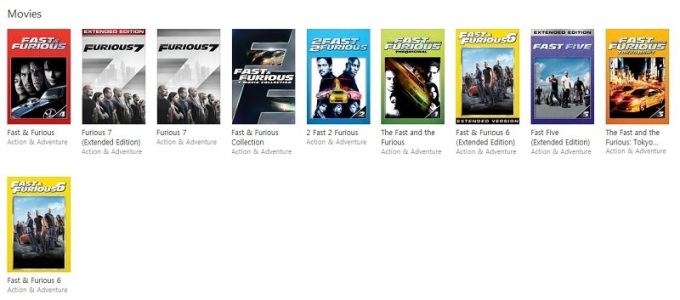
Purchase Fast and Furious from iTunes and watch them freely

The Fast and the Furious (also known as Fast & Furious) is an American franchise based on a series of action films that is largely concerned with illegal street racing and heists, and includes material in various other media that depict characters and situations from the films. Distributed by Universal Pictures, the series was established with the 2001 film titled The Fast and the Furious; this was followed by seven sequels, two short films that tie into the series, and as of May 2015, it has become Universal's biggest franchise of all time.
fast-and-furious
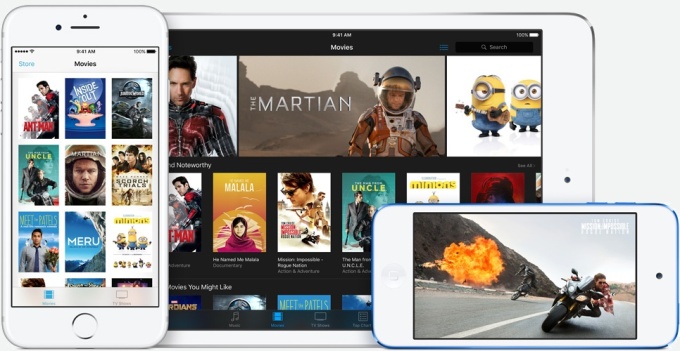
You will find the Fast and the Furious series on iTunes Store. And you can purchase or rent the movie series easily. Furthermore, you can play the purchased or rented movies on iPhone, iPad, iPod and Apple TV after iTunes 12.6 installed.
If you want to play iTunes movies on non-apple devices, you can go to try M4V Converter Plus. Why? That's because iTunes movies are M4V files with Apple Fairplay DRM protection. Due to DRM, you can only watch iTunes videos on Apple devices.

Why Choose M4V Converter Plus

M4V Converter Plus can help you to strip DRM protection of iTunes movies, TV Shows and music videos by converting M4V to plain MP4, MOV, FLV, AVI, WMV, etc.
It can also provide several device presets, including Apple TV, iPhone 7, iPad 2/3/4, Samsung Galaxy S7, Samsung Smart TV, Google Nexus, HTC mobile phone, LG smart TV, Sony PS4 / PS4 Pro/ PS4 Slim, Xbox One, etc.
>>>>>>>>>>>>>>>>>>>>>>>>>>>>>>>>>>>>>>>>>>>>>>>>>>>>>>>>>>>>>
>>>>>>>>>>>>>>>>>>>>>>>>>>>>>>>>>>>>>>>>>>>>>>>>>>>>>>>>>>>>>
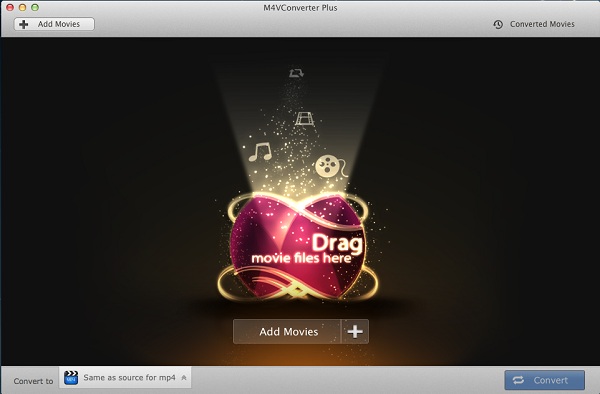
Firstly, Free download M4V Converter Plus on your computer, install and launch it. You will see the user interface.
interface
M4V Converter Plus for Win
screenshot1
M4V Converter Plus for Mac
Secondly, click Add Movies button to import iTunes videos to the program. You can also drag and drop iTunes videos to the program directly.
add
add-rentals
Thirdly, select a proper output format according to devices you own.
avi-output
mp4-output
Finally, you can start the conversion.

Topics you are interested

2017年3月27日星期一

M4V Converter Plus is rolling out the new version while Apple releases iTunes 12.6

iTunes movie rentals finally work across multiple devices

In addition to new iPhone and iPad updates, Apple has released iTunes 12.6 with a new feature for movie rental playback. Described as 'rent once, watch anywhere', Apple says you can now rent a movie on one device then finish watching it on another device.
Previously, it was possible to rent from iPhone, for example, then be restricted to that device to finish playback.
itunes_12.6
The new 'watch anywhere' feature for rentals appears to require iOS 10.3 and tvOS 10.2 however, although iOS is currently in developer and public beta and tvOS is only available in developer beta previews. Both software updates are likely coming soon for all users based on previous beta cycles as well as this iTunes release.
Apple still enforces time limits on watching rental movies as detailed here, however, but the new 'watch anywhere' function is a nice step forward. iTunes 12.6 is available as a free update through the Mac App Store.

Watch iTunes rentals anywhere with M4V Converter Plus

In order to support the latest version of iTunes 12.6, M4V Converter Plus Inc. has announced new version of iTunes Rental Converter  - M4V Converter Plus for Windows and Mac. 
M4V Converter Plus can remove DRM protection from iTunes rented movies and allow you to play iTunes rentals on Apple devices, Android devices like Samsung Galaxy 7, LG V20, HTC, Google Nexus, Huawei P10 , Galaxy Tab 3, Sony PS4, Xbox One, etc.
M4V Converter Plus for Windows has been released its new version 5.3.1. The new features including Fix the registration crash, support iTunes 12.6, optimize the details of the user interface, add Feedback function, and add iCloud Movie window, fix some bugs.
add-rentals
M4V Converter Plus for Mac  can also support iTunes 6.
add-rentals

How to run M4V Converter Plus under iTunes 12.6

Starting with macOS 10.11 (El Capitan) , Apple has introduced System Integrity Protection (SIP). This may prevent M4V Converter Plus to running.
If you are the macOS 10.11 or later users with iTunes 12.6 installed , you need to do some settings to make the software work.
There are 2 ways to make M4V Converter Plus for Mac work successfully.

Guide of converting iTunes Movie rentals for playing anywhere

Free download M4V Converter Plus for Mac or Windows on your computer, install and launch it. 
Step 1. Click Add Movies button to import iTunes movies to the program.
Step 2. After added the movies, you can choose a proper output format as the devices you own.
step 3. Start the conversion.

Related Topics:

2017年3月21日星期二

Apple launches red iPhone 7

Apple is introducing a new color option for its iPhone 7 lineup today: red. While the iPhone maker has offered special product red cases for the iPhone previously, this is the first time the actual handset is available in red itself. The new Product (RED) iPhone features a red aluminum finish, and is launching as part of Apple's partnership with (RED).
“The introduction of this special edition iPhone in a gorgeous red finish is our biggest (PRODUCT)RED offering to date in celebration of our partnership with (RED), and we can’t wait to get it into customers’ hands," says Apple CEO Tim Cook.
apple-iphone-7-red
Apple's partnership with (RED) involves highlighting the AIDS fundraising campaign with red-themed designs for products and apps. Apple recently turned its App Store and associated top apps the color red for the world AIDS day.
Apple’s last color change to its iPhone lineup involved a new glossy jet black finish for the iPhone 7, and before that the company also introduced the rose gold option with the iPhone 6S. Today’s red option is perhaps the most striking of all the colors available for the iPhone 7 and 7 Plus, and it will be available on Friday, March 24th in 128GB and 256GB models starting at $749. Source from http://www.theverge.com

Topics you may be interested

Everything you need to know about iPhone 7, a water-resistant body, better cameras, 256GB capacity and no headphone jack

How to transfer iTunes movies to iPhone 7 Plus

2017年3月20日星期一

Motorola Moto G5 Plus vs Moto G4 Plus, Play iTunes movies on Moto G Plus (5th gen.)

Moto G5 Plus vs. Moto G4 Plus

Moto G5 PlusMoto G4 Plus
Operating SystemAndroid 7.0 NougatAndroid 6.0.1, Android 7.0 Nougat (in some markets)
Display5.2-inch 1080p (1920x1080) IPS LCD panel,424ppi pixel density5.5-inch 1080p (1920x1080) IPS LCD panel,401ppi pixel density
SoCOcta-core Qualcomm Snapdragon 625, Eight Cortex A53 cores at 2.0GHz, 14nmOcta-core Qualcomm Snapdragon 617, Four Cortex A53 cores at 1.5GHz, Four Cortex A53 cores at 1.2GHz, 28nm
GPUAdreno 506Adreno 405
RAM2GB/4GB RAM2GB/4GB RAM
Storage32GB/64GB storage
microSD slot up to 256GB
16GB/32GB storage
microSD slot up to 256GB
Rear camera12MP f/1.7 lens, dual LED flash, PDAF, 4K video recording16MP f/2.0 lens, dual LED flash, PDAF
Front shooter5MP
1080p video recording
5MP
1080p video recording
ConnectivityWi-Fi 802.11b/g/n, Bluetooth 4.2 (A2DP), GPS,
microUSB, 3.5mm audio jack
Wi-Fi 802.11a/b/g/n, Bluetooth 4.1 (A2DP), GPS,
microUSB, 3.5mm audio jack
Battery3000mAh battery3000mAh battery
FingerprintFront fingerprint sensorFront fingerprint sensor
Dimensions150.2 x 74 x 7.7mm153 x 76.6 x 9.8mm
Weight155g155g
ColorsGrey, GoldBlack, White

Motorola Moto G5 Plus Review

Motorola Moto G5 Plus smartphone was launched in February 2017. The phone comes with a 5.20-inch touchscreen display with a resolution of 1080 pixels by 1920 pixels at a PPI of 424 pixels per inch. Motorola Moto G5 Plus price in India starts from Rs. 16,999.
The Motorola Moto G5 Plus is powered by 2GHz octa-core Qualcomm Snapdragon 625 processor and it comes with 4GB of RAM. The phone packs 32GB of internal storage that can be expanded up to 128GB via a microSD card. As far as the cameras are concerned, the Motorola Moto G5 Plus packs a 12-megapixel primary camera on the rear and a 5-megapixel front shooter for selfies.
Motorola-Moto-G5-Plus-2017
The Motorola Moto G5 Plus runs Android 7.0 and is powered by a 3000mAh non removable battery. It measures 150.20 x 74.00 x 9.70 (height x width x thickness) and weigh 155.00 grams.
The Motorola Moto G5 Plus is a dual SIM (GSM and GSM) smartphone that accepts Nano-SIM and Nano-SIM. Connectivity options include Wi-Fi, GPS, Bluetooth, NFC, USB OTG, FM, 3G and 4G (with support for Band 40 used by some LTE networks in India). Sensors on the phone include Proximity sensor, Accelerometer, Ambient light sensor and Gyroscope.

Referred Reading: Play iTunes movies on Moto G5 Plus

Generally speaking, iTunes movies we purchased or rent are M4V files with Apple DRM protection. Due to DRM, you can only play iTunes movies on iPhone, iPad, iPod and other Apple devices.
If you want to play iTunes movies on Moto G5 Plus, you should remove DRM protection from iTunes movies and convert M4V to the format Moto G5 Plus supported.

Moto G5 Plus support video formats:

  • MPEG4 + AAC: video up to 296 Kbps, 320 x 240, 15 fps., 44 kHz, stereo audio in .mp4, 3gp, .pvs, .pvp, .pvx file formats
  • H.263 + AAC: video up to 296 Kbps, 320 x 240, 15 fps., 44 kHz, stereo audio in .mp4, 3gp, .pvs, .pvp, .pvx file formats
  • Real Audio + video: video up to 296 Kbps, 320 x 240, 15fps., 44 kHz, stereo audio in .rm, .rmvb file formats

Moto G5 Plus support audio formats:

  • AAC (up to 192 Kbps)
  • AAC+ (16 to 128 Kbps)
  • MP3 (up to 320 Kbps)
  • WAV (no limit)
  • WMA v9 L2, v3, v7, v8 (up to 160 Kbps)
  • Real Audio G2, 8 (up to 96 Kbps)
  • Real Audio 10 (up to 192 Kbps)
M4V Converter Plus is a professional iTunes Movie Converter. With it, you can legally strip DRM from any iTunes videos, including iTunes purchased movies, iTunes Rentals, TV Shows and music videos. It can also convert the protected M4V files to unprotected MP4, AVI, FLV, AVI, MOV, WMV, etc.
It can also allow you to extract MP3, AAC, FLAC, WMA audio from iTunes videos with high conversion speed and output quality. It can work well on Mac and Windows platforms with the latest iTunes installed.
You can click Add Movie button to import iTunes videos to the program. And you can go to profile panel to set output format for your Moto G Plus.
M4V Converter Plus support output formats:
Convert DRM M4V to MP4, M4V to MOV, AVI, VOB, WMV
Extract M4V to MP3, AAC, WMA, M4A, MP2, M4R, etc.
Users can play iTunes DRM-ed M4V videos on various devices like iPhone SE, iPhone 7, iPhone 6S plus, Samsung Galaxy S7, Google Nexus, Xbox 360, PS4, Xbox One, LG G6,  etc.
After all settings done, you can Start the iTunes movies to Moto G5 Plus conversion.

2017年3月15日星期三

Huawei P10 vs Huawei P9: What is the difference

The Huawei P10 and P10 Plus have been announced at a press conference the day before Mobile World Congress 2017 kicks off in full in Barcelona. The new devices have improved designs, enhanced camera technology and a few other upgrades to refine the already impressive Huawei P9.
See the detailed difference between Huawei P10 and Huawei P9.
Huwei P10Huawei P9
OSAndroid (7.0), Emotion UIAndroid (7.0, 6.0), Emotion UI
Size(mm)145.3 x 69.3 x 7145 x 70.9 x 7
Weigh(g)145144
Display5.1in display5.2in display
ResolutionFull HD (1920 x 1080) resolutionFull HD (1920 x 1080) resolution
RAM4GB3GB
Built-in storage64GB32GB
Storage expansionmicroSD, microSDHC, microSDXC up to 256 GBmicroSD, microSDHC, microSDXC
CameraDual-camera (20-megapixel), (12 megapixels/front)Dual-camera (12-megapixel, F2.2 aperture), (8 megapixels/front)
Battery3200 mAh3000 mAh
fingerprint scannerRemovedY
colorGraphite Black, Dazzling Blue, Dazzling Gold, Rose Gold, Greenery, White Ceramic, Mystic Silver and Prestige GoldCeramic White, Haze Gold, Rose Hold, Titanium Grey, Mystic Silver and Prestige Gold
Keyboard coverNN
FeaturesScratch-resistant glass (Corning Gorilla Glass 5), Light sensor, Proximity sensorLight sensor, Proximity sensor
Release dateFebruary 2017April 2016
Price€ 649€ 599

Referred Topic: How to Watch iTunes Movies on Huawei P10

Huawei P10 vs Huawei P9: Design

Much of the design on the Huawei P10 has come directly from last year’s phone. If you were to see these two phones sat next to each other, it would be a little difficult to judge which is which without studying them.
The biggest change is the fingerprint scanner, which was on the rear of the Huawei P9, but has moved around to the front of the P10. Huawei claims this is for a more minimalist design, but it hasn't made the phone any thinner than the P9.
Huawei-P10-vs-Huawei-P9
Another big change for the Huawei P10 is rounder corners. This helps lead to an iPhone 6S -like look, to the point that you'll likely struggle to tell the two apart with a quick glance.
The other major difference between the Huawei P10 and P9 are the designs for the back of the phone. The Huawei P9 only comes in either a stainless steel metal uni-body or a Ceramic White version.
Ceramic White still uses metal, it just covers it with a coating that makes it look and feel different to the standard option. There's also a Ceramic White version of the Huawei P10.
Huawei-P10-vs-Huawei-P9-back
Huawei is launching the P10 in black, silver, green, rose gold and a normal gold effect.

Huawei P10 vs Huawei P9: Display

The Huawei P10 has a 5.1-inch Full HD display, which is a slight downsize on the 5.2-inch Full HD screen on the Huawei P9.
Both phones have bright screens, but if you want a higher resolution on a Huawei handset you’ll have to opt for the newly launched Huawei P10 Plus , which features a 5.5-inch QHD display.
The big upgrade for the screen on the Huawei P10 comes in the protection, which is now upgraded to Corning Gorilla Glass 5, from Gorilla Glass 3 tech on the P9.

Huawei P10 vs Huawei P9 OS and power

The Huawei P10 has been upgraded under the hood. The P9 comes with a Huawei-produced Kirin 955 chipset, but on the newer phone there’s now a newer Kirin 960 chip, which we saw originally in the Huawei Mate 9 .
The P9 also comes in two different versions, one with 3GB of RAM and 32GB of storage, and another with 4GB of RAM and 64GB of storage, but Huawei has limited it to the latter specs for all models of the Huawei P10.
As for software, the latest Emotion UI 5.1 will be running on the Huawei P10 when it’s available, and that comes with Android 7 Nougat software baked in. The P9 launched with Android 6 Marshmallow on board, but you can now upgrade it over-the-air to Android 7.
Huawei-P10

Huawei P10 vs Huawei P9 : camera and battery

The Huawei P9 has a 12MP RGB sensor for color images, but will then combine that with an image taken from a 12MP monochrome (black and white) sensor that will give extra detail to each image.
On the Huawei P10 it’s a very similar affair, but instead this time there’s a new 20MP monochrome sensor to help ensure better detail in each of your shots.
For selfies, both the Huawei P10 and P9 have 8MP sensors that should be able to help you out when shooting front-facing shots for social media.
The P10 also comes with a new facial tracking technology that can use up to 190 points of a human face to track down the best selfie shots possible. Whether this actually works in practice, we haven't found out yet.
Battery capacity on the Huawei P10 has been upgraded from 3,000mAh on the P9 to 3,200mAh. We didn’t love the battery life on the Huawei P9, so hopefully this slight upgrade will give it a significant amount of extra life from a single charge.
Both phones also come with fast-charging features and charge via a USB-C connection on the bottom edge, but neither comes with wireless charging.
Huawei-P10-vs-Huawei-P9-camera

Huawei P10 vs Huawei P9: Price

The Huawei P9 launched at $470 (£449.99, AU$799), but it's expected that the Huawei P10 will launch at a higher price. The only official price we know so far is it will cost €649 in Europe, which works out at around £550/$680/AU$890.
The P9 however has already dropped to £400 in the UK and it will likely be even cheaper when the Huawei P10 is officially out.

Recommendation: Play iTunes Movies or TV shows on Huawei P10 and Huawei P9

M4V Converter Plus (for Win or for Mac) is a perfect iTunes Movie Converter, which can help you to remove DRM from any iTunes videos and convert DRM-ed M4V files to plain MP4, MOV. So you can  watch iTunes videos on Huawei P10 or Huawei P9 easily.
With it, you can legally remove DRM from iTunes purchased movies, Rentals and TV Shows by converting protected M4V to plain MP4, WMV, 3PG, etc with original subtitles & 5.1 audio tracks kept. In this way, you can play iTunes movies on any devices as you like. What's more, it also allows you to extract audio files from M4V videos and save as MP3, FlAC, WAV, WMA and so on. See the detailed tutorial about  How to Stream and Play iTunes Movies on Huawei P10.

2017年3月12日星期日

99¢ Movie of the Week on iTunes - Train to Busan

Train to Busan (Hangul: 부산행; RR: Busanhaeng) is $0.99 on iTunes US this week. It is a 2016 South Korean zombie apocalypse horror thriller film directed by Yeon Sang-ho and starring Gong Yoo, Jung Yu-mi, and Ma Dong-seok.
Train to Busan is a harrowing zombie horror-thriller that follows a group of terrified passengers fighting their way through a countrywide viral outbreak while trapped on a suspicion-filled, blood-drenched bullet train ride to Busan, a southern resort city that has managed to hold off the zombie hordes- or so everyone hopes.
train-to-busan-movie

How to Rent Movie Train to Busan in $0.99 on iTunes 

You can rent movies through:
  • A Mac or PC with the latest version of iTunes.
  • An iPhone, iPad, iPod touch with the latest version of iOS.
  • An Apple TV with the latest version of tvOS.
train-to-busan
You can rent the film Train to Busan here. When you click Rent, you can download the movie to your device by clicking or tapping download icon. Download time depends on the speed of your internet connection. Some titles have the option to stream. For these titles, when you tap or click , you can play the movie immediately, without downloading it.
To watch the rented movies, you can tap or click play icon to start streaming your movie. For downloads, you can start watching your movie as soon as enough of it has downloaded for the movie to complete without interruption. 
You can also use AirPlay to stream rented content from your Mac or PC or your iOS device to an Apple TV, but you must wait for the content to download completely.
To watch an HD movie, you need to play it on a supported device: your Mac or PC, iPhone 4 or later, iPad, iPod touch (4th generation or later), or TV using Apple TV.

How long you have to watch iTunes Rentals

You have 30 days to start watching the movie after you rent it. Once you started watching the rentals, you have 24 hours (in the US) or 48 hours (elsewhere) to finish it. You can watch the movie as often as you like until it expires.
If you don’t start watching a movie within 30 days, you must rent it again.
Movies you rent disappear from your iTunes library when the rental period ends.

How to remove DRM and Play iTunes rented movies forever

As we all known, it is convenient and cheap to rent a movie from iTunes. But there are also a lot of restrictions of iTunes rented movies: iTunes movies you rented are protected by DRM, which prevent you playing on any devices. If you rented the movie on your Mac or PC and want to watch it on iPhone, iPad, or iPod touch, it disappears from your computer’s iTunes library. And you can not share the rented movies with others freely.
M4V Converter Plus is a powerful DRM removal software and iTunes Rental Converter. With it, you can remove DRM from iTunes rented movies legally, and convert to unprotected MP4, MOV, AVI, WMV, FLV, etc. It is such a useful tool which can help you to keep iTunes rentals forever.

Step-by-step to convert iTunes rented Movie Train to Busan 

Free download M4V Converter Plus (Mac & Windows) on your PC. It works well on Mac and Windows platforms with the latest iTunes installed. Then Click Add Movies button to import iTunes rented movies to the program. 
add-rentals
M4V Converter Plus for Mac

add-rentals
M4V Converter Plus for Win

From profile list to select a proper output format. 
mp4-output
Set MP4 as output format

mp4-output2
Finally, start the conversion. When the conversion is finished, you can find the converted movie on the Converted Movies folder. Now you can play the rented iTunes movies freely. 

More Topics You may be interested