显示标签为“iTunes movies converter”的博文。显示所有博文

2018年12月17日星期一

M4VConverter Plus 2018 Christmas & 2019 New Year Special Offer – Save Up to 25%!


M4V Converter Plus Inc. released its 2018 holiday month overall. The holiday shopping season is set to begin at December 15, 2018, and ends at January 15, 2019. This sale will last a whole month. Customer can get all the M4V Conversion tools with 25% off on 2018 Christmas & 2019 New Year special sale season.

All-in-one iTunes Video Conversion Tool Availability of 2018 Special Offer 

To express our gratitude for all your support in the past year, M4V Converter Plus Inc. announced its special sales activity for the coming big holiday. All the customers will save a Ton of money off of its regular prices, the special offer is only available during this once-a-year sale! It will starts on Dec 15, 2018 and ends at Jan 15, 2019.


The sales is available to both M4V Converter Plus for Mac and Windows programs. With M4V Converter Plus, you can remove DRM protection from iTunes rented movies, purchased movies and TV shows. Besides, it can help you convert all the iTunes videos to common MP4, AVI, FLV, WMV, MOV and other video formats with 100% original quality kept.
It provides you a free trial version, which can let you download it for free and try it firstly.


This promotion will begin from December 15, 2018 and expired on January 15, 2019. During the promotion month, customers can purchase it from the M4V Converter Plus Inc. official website (https://m4vconverterplus.com/), No coupon codes required.

About M4V Converter Plus Inc.
M4V Converter Plus Inc. is a software company that offers iTunes M4V video conversion solutions. With expertise and experience in iTunes video converter tools, its mainly products M4V converter software do well in converting m4v video you purchased or rent to QuickTime MOV, iPod, iPhone format with high speed and great quality.
Contact Info:
Name: Amy Green
Address: P.O. Box 1568, Cortaro, AZ, United States of America
Zip code: 85652
Email: market@m4vconverterplus.com

2017年4月11日星期二

Android and SD cards - Watch iTunes movies stored on SD Card

SD card form factors

Before you do anything, make sure your phone can use an SD card! Since so many different companies make Android phones in so many different models, you will run across some that don't have a slot for a card. Phones from Google are this way, and every name you recognize when it comes to making phones has made at least one model that doesn't have support for an SD card. If you're not sure, poke around the outside of your phone to see if any doors or flaps open up, or grab the manual out of the box and see what it says.
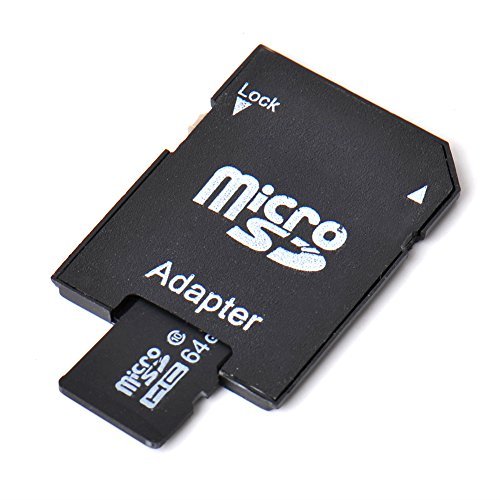
64GB-Micro-SD
Once you've got that sorted, you need to make sure you get the right type of SD card. For your Android phone, you're looking for the microSD form factor. SD cards come in three different sizes. An SD card is the biggest - a little larger than a postage stamp - and is used for things like standalone cameras. The Mini SD form factor is about half the size of a full SD card and they aren't very popular. Chances are you won't ever buy anything that needs a Mini SD card. The microSD card is about the size of your fingernail and the one we're looking for.

SD card storage versions

The next thing you need to know is the storage version. You can buy microSD cards, microSDHC cards, and microSDXC cards. A microSD card was designed to hold up to 2GB of information, though a few 4GB versions are available that work outside of the specifications. microSDHC cards (Secure Digital High Capacity) are designed to hold up to 32GB of data. microSDXC (Secure Digital eXtra Capacity) cards are designed to hold between 32GB and 2TB of data. It's important to know what version your phone can use. Most modern phones — Android or otherwise — will be able to use a microSDHC card. Many newer phones are capable of using a microSDXC card.
There are no easy-to-see differences between a phone that can use a microSDXC card and one that can't. You'll need to consult the documentation that came with your phone or hop into the forums and ask other folks who have already found the answer. The versions are backward compatible (a microSDXC card slot can use a microSD or microSDHC card) but there is no forwards compatibility, and if your phone can't use a microSDXC card, it won't ever work.

SD card speed classes

You need to understand the speed class ratings. Those are the numbers and letters you see printed on the card and the packaging. The short version is to never buy one with a number lower than 10 when it comes to speed class, and if you use a phone with a 4K camera, go even faster and look for a UHS class card.

Adoptable storage and you

You'll probably see people talking about adoptable storage when SD cards and Android are in the conversation. It's a really neat thing that your phone probably doesn't have and chances are you're better off for it.
The idea is to use a fast SD card and make it a permanent part of the system. Once it goes in, it never can come out or all your stuff stops working. It's also a part of the phone it came out of and nothing else will be able to use it unless you reformat it and start over.
Micro-SD-64-GB-With-Adapter
This, and concerns about performance, is why most companies making Android phones don't let you use Adoptable storage without hacking it in yourself. On Android things that aren't phones — like the NVIDIA Shield TV for example — you can plug in USB stick drives or hard drives and "adopt" them into the system. This makes a little more sense and a 500GB USB drive is a great match for your Android TV box.

Watch iTunes movies stored on SD Card

I just purchased a movie through iTunes. I want to put the movie on an SD card that I have that fits into a USB accessory so we can use it on different computers. How do I do that? I tried to just drag it to the SD card but it didn't work. ---- by chopperchick asked on apple communities center.
Suppose you have purchased some movies from iTunes like chopperchick and came cross the same problem. M4V Converter Plus can help you out. We can solve the problems from two parts.

Part 1. Convert iTunes Movies or TV shows to SD card

With M4V Converter Plus, you can easily convert iTunes DRM-ed videos, including purchased movies, Rentals and music videos, to unprotected MP4, MOV, FLV, AVI, WMV, MPEG, 3PG, etc. 
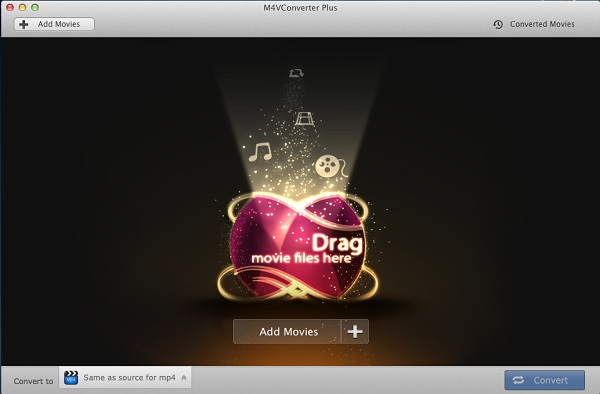
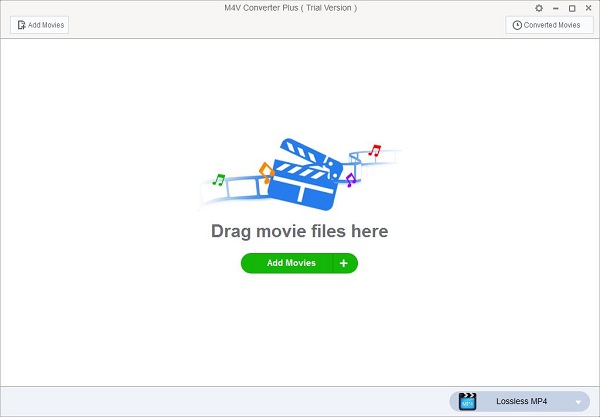
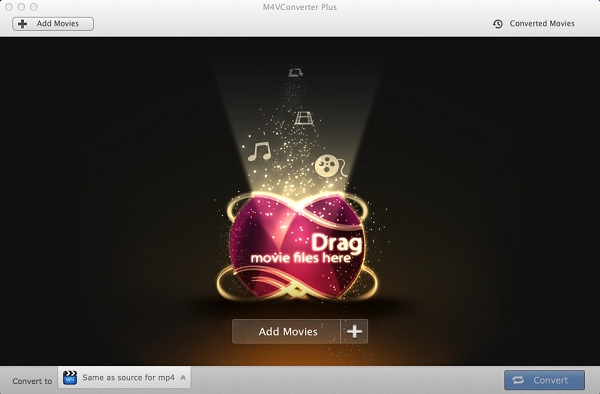
Step 1. Free download M4V Converter Plus on your Mac (Windows users can click here). Install and launch it, you will see the interface as below.
screenshot
Step 2. Click Add Movies button to import movies you want to convert from iTunes library.
add-rentals
Note. M4V Converter Plus support batch conversion, you can add several videos at same time. 
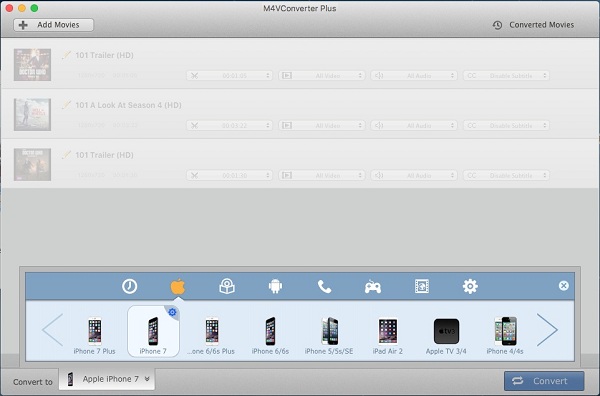
Step 3. You can select an unprotected output video formats from Convert to profile list.
iphone7-preset
Note. You can directly select the devices you have, such as iPhone 7, Samsung Galaxy S8, HTC 10, LG V20, Google Nexus series, Sony PS4, Xbox one, etc.
Step 4. Finally, click Convert button to start iTunes videos conversion.
convert1.jpg

Part 2. Watch iTunes movies stored on SD Card

Step 1. Connect the external SD card to one of your computer's USB ports (if you do have an internal card reader or the SD card interred in your Android phone ).
Step 2. After conversion, you can find the plain iTunes videos at Converted Movies.
Step 3. Drag and drop the converted iTunes videos to the SD card.
If you play the movies stored on SD Card  in your Android phones, you can directly open the videos.
And if the movies only stored on SD card, you can insert the SD card into the SD card reader, then plug the SD card reader into the devices which has USB plug. Now you can transfer and play iTunes movies anywhere.
Related topics

2017年3月8日星期三

Latest Samsung Galaxy S8 leak gives us a close look at home button changes

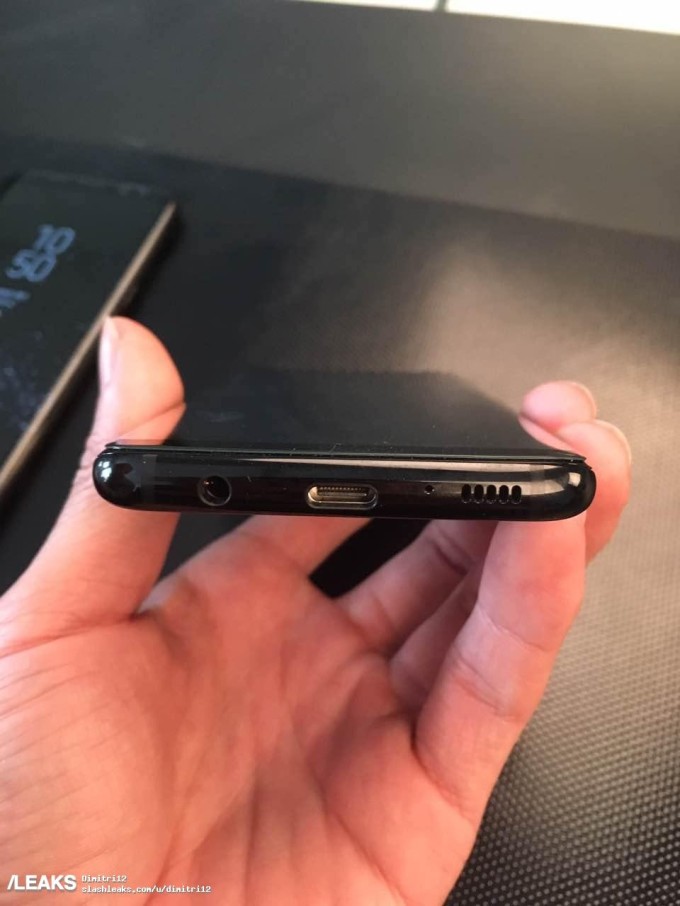
Samsung is planning to launch its Galaxy S8 handset on March 29th, but theverge site have already seen photos, videos, and even press images leak ahead of its debut. A fresh round of hands-on images have leaked today, and they give us a slightly better look at some big design changes Samsung is making to its 2017 flagship smartphone.
samsung -galaxy-s8-camera-leaks
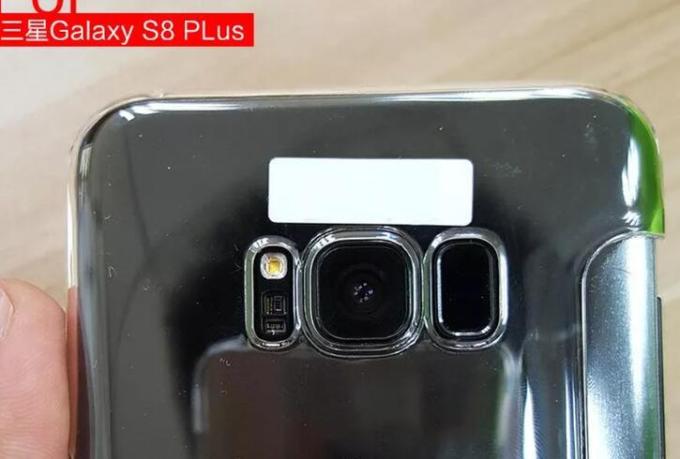
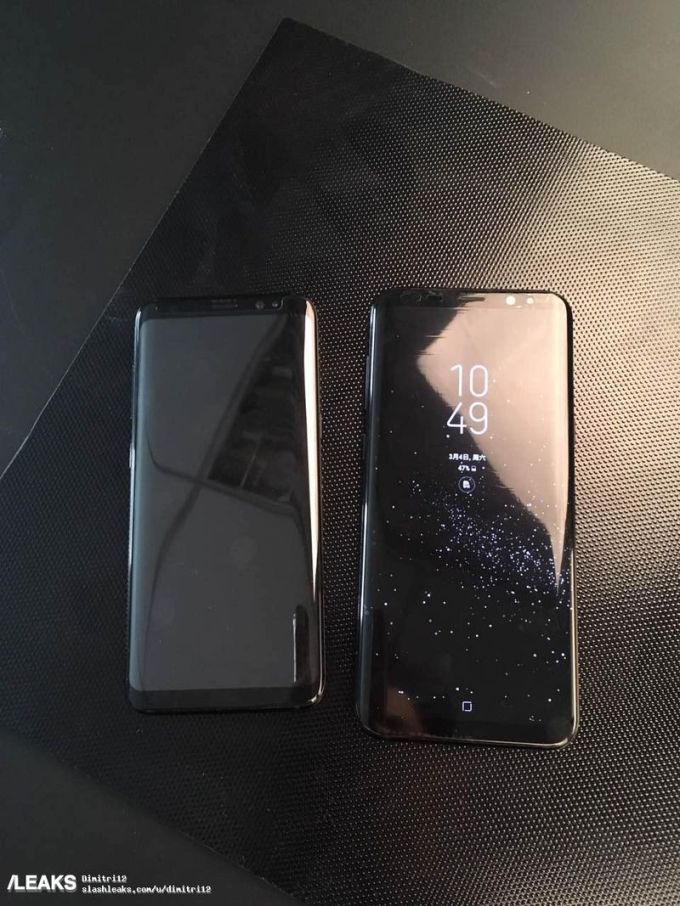
Slash Leaks has provided some close up images of the new on-screen home button for the Galaxy S8, and a good idea of just how small the front bezels are. They look incredibly small, which has clearly been aided by removing the physical home button from the front of the display. At the back of what is reportedly the larger Galaxy S8 Plus, you can see a separate sensor next to the camera that appears to be the fingerprint reader.
gs8-s8plus-size-4
We’ve heard rumors of the fingerprint reader at the rear before, but this is the best look we’ve seen so far. Sam mobile speculates this could also work as a physical home button, but it seems unlikely that Samsung would want to force Galaxy S8 owners to reach for the rear of their device to navigate around Android. Given the vast amount of Galaxy S8 leaks, we might know the answers to the home button mystery and other aspects of the device before the phone even launches on March 29th.
samsung -galaxy-s8-leaks
To put things in perspective, the smaller S8 on the left allegedly has a 5.7-inch display, the same size as last year’s ill-fated Galaxy Note 7, which makes the relative size of the 6.2-inch S8+ even more impressive. It’s yet another detail about the S8 that we can check off our list of questions, along with what it looks like, whether it’ll have buttons, and where the fingerprint sensor is.
The Galaxy S8 is expected to be announced on March 29th. Hopefully Samsung will still have a surprise or two up its sleeve to actually unveil when the event finally rolls around.

Recommendation: Transfer and Play iTunes Movies on Samsung Galaxy S8

M4V Converter Plus is a powerful, easy-to-use utility for quick and accurate conversion. With it, you can unlock iTunes M4V videos by stripping DRM protection legally. It can allow you to convert any iTunes videos to plain MP4, MOV, AVI, FLV and other video or audio formats with amazing speed. In this way, you can transfer the converted iTunes movies to Samsung Galaxy S8 easily.
The main functions of M4V Converter Plus as below
  • Remove DRM from iTunes purchased movies, music videos and TV shows.
  • Convert iTunes rentals to unprotected MP4, MOV without limitations.
  • Perfectly keep AC3 Dolby 5.1 audio track while converting M4V movies.
  • While converting HD & SDHD videos, it outputs 100% original video quality.
  • 30X faster speed while converting iTunes purchases or rentals to MP4/MOV
  • Convert DRM M4V to MP4, MOV, AVI, FLV, 3GP, etc on Mac/Win.
  • Output presets for iPhone, iPad Air, Apple TVSamsumg GalaxyAndroid, etc.
Topics you may be interested

2016年12月20日星期二

How to Watch iTunes movies on LG V20 without iTunes

LG V20 Review

The LG V20 is the first Android 7.0 Nougat smartphone to be officially announced. It's main display is a 5.7-inch LCD panel with Quad-HD resolution (1440 x 2560) and 513 pixels per inch pixel density. LG hasn't described whether that's a Quantum Dot panel or whether there is any special display technology of some kind involved at all.
lg-v20-specs

Step-by-step guide to Watch iTunes movies on LG V20 without iTunes

To watch your purchased and rented iTunes movies on LG V20 at will, at first you need to remove Fairplay DRM protection. M4V Converter Plus (for Mac and Windows) is such a powerful DRM removal tool for you. It will help you to strip DRM protection from iTunes videos, then convert iTunes movies, TV shows and music videos to LG V20 supported video formats with high speed. The following is a detailed tutorial about how to convert iTunes movies to MP4 so that you can play iTunes movies on LG V20 at will.
Firstly, free download the program on your Mac or Windows, install and open it. iTunes will launch automatically.
 download-win    download-mac
interface
Interface of M4V Converter Plus for Win

interface1
Interface of M4V Converter for Mac
Secondly, Click Add Movies button to import iTunes movies to the program. It allows you to convert iTunes purchased movies, iTunes Rentals, TV Shows and music videos. 
add-rentals
Import iTunes rented movies

add-rentals
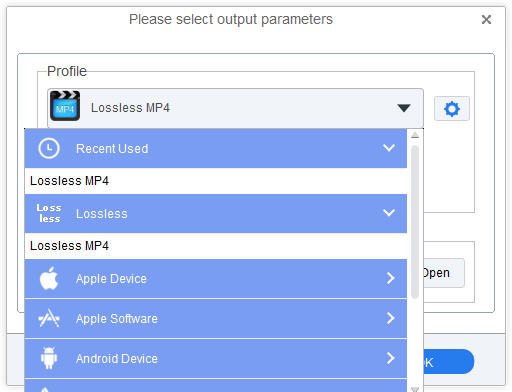
Thirdly, this step is very important. You can select a proper video format. MP4 is the best format for LG V20. Mac users can choose Same as source for mp4 from profile list, and windows users set Lossless MP4 by default. 
mp4-output
Convert iTunes movies to MP4
mp4-outputFinally, start iTunes movies to MP4 conversion. Mac users can click Convert button, Windows users hit profile panel.
You can find the conversion will finish in few minutes, because M4V Converter Plus support converting iTunes movies in 30X faster speed. Now connect your LG V20 with your computer via USB drive, drag and drop the converted iTunes movies to your LG V20. Now you can watch all your iTunes movies to LG V20 without iTunes.


How to play iTunes movies on LG G5 Freely

How to convert iTunes M4V videos to LG Smart TV

2016年2月1日星期一

Apple now offering $9.99 HD Action movies on iTunes Store

Big good news for Action Movie Fans! Apple is having a sale on recent hit action movies with iTunes Extras, selling them for $9.99 in HD quality. And most films you can rent from price $0.99 to $5.99.  The special sales' page currently features 32 action movies with iTunes Extras.
action-movies
All the action movies are as follows with rental price:
  1. Mission: Impossible – Rogue Nation   $4.99
  2. Maze Runner: The Scorch Trials   $5.99
  3. Hitman: Agent 47   $5.99
  4. Fantastic Four    $5.99
  5. The Man from U.N.C.L.E.   $4.99
  6. No Escape    $5.99
  7. San Andreas     $4.99
  8. American Ultra   $ 5.99
  9. Zero Dark Thirty     $3.99
  10.  Fury (Not available for rent)
  11. John Wick (Not available for rent)
  12. Live Die Repeat: Edge of Tomorrow (Not available for rent)
  13. 3:10 to Yuma (2007)    $3.99
  14. The Equalizer (Not available for rent)
  15. Pacific Rim    $4.99
  16. The Wolverine     $3.99 
  17. Momentum     $0.99
  18. Looper     $3.99
  19. Blackhat (Not available for rent)
  20. The Hunger Games: Catching Fire   $4.99
  21. Red 2     $4.99
  22. A Walk Among the Tombstones (Not available for rent)
  23. 300    $3.99
  24. The  Matrix     $3.99
  25. The Amazing Spider-Man 2 HD (Not available for rent)
  26.  Non-stop      $3.99
  27. Ender's Game     $4.99
  28. Dawn of the Planet of the Apes (Not available for rent)
  29. Hercules (Extended Cut) (Not available for rent)
  30. The Raid 2    $3.99
  31. Mad Max    $3.99
  32. Mission: Impossible    $3.99
While all above movie titles share their HD version with $9.99, you may only get lower-quality SD copy in order to ensure compatibility with all video-capable Apple devices. And now you don't have to worry about the quality. With iTunes Movies Converter, you can convert all iTunes movies (all purchases & rentals included) to apple devices and non-apple devices.
Features:
* Easily convert iTunes movies, TV shows, music videos with quick clicks.
* Legally remove DRM protection from iTunes protected M4V videos.
* Clip and get small segments from the whole iTunes movies.
* Provide various presets to meet your media player.
* Customize the output video format to individualize the video.
* Support output video formats: MP4, MOV, AVI, FLV, WMV, VOB, 3GP, etc.
* Support extract audio formats: WMA, MP3, MP2, AAC, FLAC, M4R, M4A, AMR, etc.

2016年1月19日星期二

The top 10 movies on the iTunes Store in Jan, 2016

iTunes Movies U.S. charts for week ending Jan. 17, 2016:
itunes-top-movies
iTunes Movies US Charts:
1. The Martian
2. Sicario
3. Hotel Transylvania 2
4. Ex Machina
5. Black Mass
6. Straight Outta Compton (Unrated Director's Cut)
7. The Last Witch Hunter
8. Goosebumps
9. Burnt
10. Trainwreck
iTunes Movies US Charts - Independent:
1. Ex Machina
2. Burnt
3. Irrational Man
4. Infinitely Polar Bear
5. A Walk in the Woods
6. The Benefactor
7. Amy
8. Meru
9. Lamb
10. Cartel Land
Note: All above movies you can buy or rent from iTunes store. And if you have purchased or rented iTunes movies and want to play those movies on non-apple devices, you can free download iTunes movies converterIt is an all-in-one iTunes M4V Converter and Apple DRM protection removal program.

Just via Add Movies -> set output format -> start conversion three quick steps. You can finish the conversion progress quickly. Then you can transfer the converted iTunes movies to the mobile devices you have. 
——
(copyright) 2016 Apple Inc. By the Associated Press

2015年12月17日星期四

Star Wars: The Force Awakens Premiere on December 18, 2015

If you are a fan of iTunes movies, you will find the most downloaded films overall of iTunes 2015 is Star Wars Digital Collection.  Got the exciting news for you. The seventh installment in the main Star Wars film series returns to the big screen with Star Wars: The Force Awakens.  
The Force Awakens is scheduled for release on December 18, 2015, in 2D, 3D, and IMAX 3D, more than 10 years after the release of the franchise's last installment, Star Wars Episode III: Revenge of the Sith (2005). Now you can get the ticket from Star wars official website.
Star Wars: The Force Awakens Trailer (Official)

It was one of Hollywood's biggest nights ever as celebrities walked alongside stormtroopers for the premiere of Star Wars: The Force Awakens.
Star Wars Digital Collection Available on iTunes
Star Wars Digital Collection is the most downloaded film on iTunes of 2015. It went on sale from April this year. You can buy all six movies as a bundle for $89.99. And this new Star Wars collection is ideal for those who want to take the movies on your travel and enjoy the bundle with family.

You can also store the Digital Collection on non-apple tablets, smartphones or laptops. That might astonish you. How to do? 
How to play iTunes purchased movies Freely
Download and install M4V Converter Plus (Windows versionMac version), a smart iTunes purchased movies converter, as well as iTunes rentals converter program for personal use. 
Step 1: Import movie Star Wars Digital Collection from iTunes. M4V Converter Plus supports batch conversion, you can convert Star Wars Digital Collection at the same time.  
Step 2: Choose the ideal conversion video format according to your need.
Step 3: Due to M4V video encoding technology, just click Convert button, you can start iTunes purchased movies Star Wars conversion progress. 
And then you can transfer the converted Star Wars movies onto any mobile devices, including android smartphone, mobile tablets or laptops.  Now you can play purchased Star Wars  freely. 

2015年10月28日星期三

The Perfect Halloween Film in iTunes and play iTunes movies on the go

What's the perfect movie you can see
Hocus Pocus is mainly to tell us Hollywood superstar Bette Midler (Beaches) joins Sarah Jessica Parker (Honeymoon in Vegas) and Kathy Najimy (Sister Act) as three outlandishly wild witches who return from 17th Century Salem for a night of zany fun and comic chaos. After they're accidentally conjured up by some unsuspecting pranksters, the tricky 300-year-old trio sets out to cast a spell on the town and reclaim their youth - but first they must outwit three pesky kids who are determined to foil their scheme! Loaded with bewitching laughs and magical special effects, "Hocus Pocus" is an outrageous comedy that's sure to entertain everyone.
It is released by The Walt Disney Company. So you can watch the movie with all your family members.It is the perfect flick for a Halloween.
How to get the movie and play it on the go
Hocus Pocus is specially priced (US only) in iTunes Store. Users can purchase it from iTunes Store by $ 9.99. After you bought it, you can play it on your any Apple devices, including Apple TV, iPhone, iPad. The premise is that all your devices are authorized by your Apple ID in iTunes. 

However, you can authorize up to 5 computers, which means that you can play your content on 5 different computers. You can authorize a computer only through iTunes on that particular computer. You can't authorize a computer from another computer or from your iPhone, iPad, or iPod touch.

So how can we play the purchased iTunes movies on the go? Don't worry, the best DRM removal software and M4V Converter - M4V Converter Plus comes to help you. With it, you can remove DRM protection from iTunes movie purchases & rentals and convert M4V to any other popular video formats like MP4, MOV. So that, you can play all your iTunes videos anytime and anywhere. 


Key Features of M4V Converter Plus 
  • Remove DRM protection from iTunes M4V movie Rentals and Purchases.
  • Support converting DRM-ed M4V to MP4, MOV, AVI, WMV, FLV, etc. 
  • Directly convert M4V files to fit Apple devices, Android devices, game consoles, etc. 
  • Support the new version of iTunes 12.3.1, Windows 10 and Mac OS X 10.11.
  • Works at 30x faster conversion speed with 100% original quality.

M4V Converter Plus is available for both Windows and Mac platforms. If you use a Mac, you can try the program by referring to the following tips. If you are Windows users, you can visit the site: http://www.m4vconverterplus.com/m4v-converter-plus-win/index.html  .
1. Download, install and launch the latest version of  M4V Converter Plus. You can find the simple and clear interface as below.

2. Click Add Movies button to import iTunes movies, TV episodes and music videos you want to convert. And then click Add button.
3. You can click the Convert to profile list to set the output format. 
4. After all settings done, you can click the Convert button to start the M4V files conversion.

With simple, clean and easy-to-use interface, you can get all converted iTunes videos easily. Don't hesitate to have a try!!!


2015年8月21日星期五

How to Play iTunes movies on a non-Apple device via USB Flash Drive

I would like to purchase a digital media device to play via USB, my movies that I have purchased from iTunes store. They have a ViewSonic dmp for <$90 that outputs HDMI, and input files are MP 1-4, H.264 and a few other codecs. This player reads from a NTFS or Fat16 formatted HD, which I don't see a problem there. My question is: Can I play iTunes movies using a non-Apple media device? Asked by Donald Palmer at Apple Support Communities.
If you search on Google, you will find many similar questions: How can I play iTunes movies on my android phone? How to watch iTunes TV shows on my Smart TV? How can I get my iTunes rented movie onto another computer? Obviously, iTunes brings a lot of joy, at the same time it also bring inconvenience to users.
Things you should know about iTunes video purchases & rentals

Videos purchased from the iTunes Store have FairPlay digital rights management embedded in the files and are in a format that can be readily synced to a video-capable mobile device, such as Apple TV, or on your iPhone, iPad, or iPod touch. A single device can contain purchased content from up to five accounts; iTunes will not allow you to add data from a sixth account.
If you rented the movie on your iOS device or Apple TV, you can’t move it to any other device. If you don’t start watching a movie within 30 days, you must rent it again. Movies you rent disappear from your iTunes library when the rental period ends. 
The Simplest Way to Convert iTunes TV shows, movies and music videos 
M4V Converter Plus is widely recognized as one of the best iTunes videos purchases & rentals  converting tool on the market. To solve all the problems above, you can’t miss it.
It is special designed to help users to remove FairPlay digital rights management from iTunes videos and convert M4V to almost popular plain video formats, including MOV, MP4, AVI, FLV, 3GP, etc. If necessary, you can also extract audio files from iTunes videos to save as WAV, AIFF, MP3, M4A and so on.
Tutorial: How to Play iTunes movies on a non-Apple device via USB Flash Drive
Tip: M4V Converter Plus has Mac and Windows versions, you can download either as your requirement. Here we use Windows 7 as an example.
Step 1. Launch M4V Converter Plus and iTunes will be opened automatically with it. Click “Add Movies” button to import the iTunes files you want to add.
Adding iTunes M4V files to the M4V Converter Plus.
Step 2. Here you can click “Convert to” profile drop-down list to select the appropriate output format for your non-apple devices.
Step 3. Hit “Convert” button and the smart M4V Converter will do the rest for you!
Transfer the converted files via USB Flash Drive
android_usb
  1. From your computer, find the converted videos you want to copy. The default save folder you can find by clicking Option button.
  2. Connect your device to your computer with the micro-USB cable that came with your device.For Mac customers, you will need to install the free Android Fire Transfer app to complete USB transfers.
Windows: Your device will appear in the Computer or My Computer folder.
Mac: Your device will appear on the desktop.
  1. Open your device folder, and then you can drag the converted files you want to transfer into the applicable folder:
  2. Disconnect your device from your computer. Now you can find the converted content on your devices.
Now you can play your iTunes movies, TV shows and music videos on your non-device at will.

2014年12月30日星期二

What are the most amazing movies of 2015?

The new year is coming. What are the most awaited movies of 2015? The following list I learn from gurl website can recommend for you. I am also excited the coming new year. Because there are so many wonder ful movies we can not miss. Here is the 18 best movies of 2015.
 1. Cinderella
I love when classic Disney cartoons become live-action films, and Cinderella has always been a favorite. This looks so magical and lovely, and I’m excited to see Helena Bonham Carter in such a different role.
Release Date: March 13
image
2. Insurgent
I haven’t gotten into the Divergent series yet (I say yet because I plan too!), but if you’re fan, you’ll definitely be excited to see Insurgent. It looks even more exciting!
Release Date: March 20
image

3. Minions
The minions were arguably the best part of Despicable Me, so it makes sense that they would get their own movie. This is the kind of adorable movie you can bring your little cousins to so you can impress your older family members, but also still enjoy yourself.
Release Date: July 10
image
4. The Hunger Games: Mockingjay Part Two
OMG I am so excited for this movie. I liked part one of Mockingjay, but it also kind of felt like one long trailer for the second part of the story. I love The Hunger Games so much, and while it’s definitely going to be sad to say goodbye to the series, I know we’re all excited for this film.
Release Date: November 20
image
5. Pitch Perfect 2
Sorry to repeat myself, but OMG I AM SO EXCITED FOR THIS MOVIE. I normally don’t love sequels, but Pitch Perfect was so, well, perfect, that I’m sure the second one will be just as good. Plus, the trailer really gives me hope. These ladies are hilarious, and it’s so awesome to have such a female driven movie that everyone is so amped for. And this time, we get to see The Bellas compete on an even larger scale. Bring it on!
Release Date: May 15
image
6. The Avengers: Age Of Ultron
It’s hard for a superhero movie to NOT be a hit, especially when it’s one like this that combines so many of our favorite characters. The first Avengers was great, and I’m expecting this one to be just as good, if not better, because Elizabeth Olson! The trailer really doesn’t give too much away, despite it’s length, but it still looks very exciting.
Release Date: May 1
image
7. Pan
I don’t know which live-action feature I’m more excited for: this one or Cinderella. This version tells a different story than the one we’re all used to, but I think that only makes it seem more interesting.
Release Date: July 17
image
8. Jurassic World
Who didn’t love Jurassic Park? And, by the way, who doesn’t love Chris Pratt? I can’t wait to see this updated version of the old favorite, starring a celebrity who deserves every great movie and more. OMG just writing about it is making me excited.
Release Date: June 12
image
9. Paper Towns
I haven’t read this book yet, and I didn’t want to read any spoilers, so I’m not really sure what the movie will be about. But it’s brought to you by John Green, the same guy who brought us The Fault In Our Stars, so I can only imagine that it’s going to be really great.
image
10. Magic Mike XXL
This movie is going to be ridiculous in the best way possible, just like the first one. I’m all for a film that lets us see more of Channing Tatum, and I know you guys are too.
Release Date: July 1
image
11. Fifty Shades Of Grey
Oh man, this movie is going to be all sorts of bad. I actually can’t wait to see it because I can’t wait to make fun of it. I haven’t read the book because I like reading books that are good, but I’m going to see this anyway, along with the rest of the female population. Get ready for a sexy movie that will probably also make you giggle a little bit.
Release Date: February 13
image
12. The Fantastic Four
All the superhero movies! I can’t wait to see this. It looks amusing, exciting, and overall just entertaining. It’s definitely going to be one of the biggest summer hits.
Release Date: July 8
image
13. The Jungle Book
They haven’t released many details about the live-action version of The Jungle Book, but I know I’m not the only one who’s curious about how they’re going to pull this off in a good way. I loved this movie as a kid, and I can’t wait to see what happens with this version.
Release Date: October 9
image
14. The Scorch Trials
Eeeiii! I didn’t read the books, but I LOVED The Maze Runner, which came out earlier this year. It was so exciting and so, so good. I absolutely cannot wait for The Scorch Trials, the second movie in the series.
Release Date: September 18
image
15. Ted 2
Seth MacFarlene is a jerk, but you have to admit that Ted was kind of hilarious. I have to say that I’m a bit nervous about this sequel, but I’ll probably see it anyway just to see what it’s like. Also, Mila Kunis!
Release Date: June 26
image
16. Entourage
If you watched Entourage when it was on HBO, then I know you’re excited for the movie. It’s been a long time coming, and I’m getting super antsy trying to figure out what E, Vince, Turtle, Johnny and Ari have been up to. I’m basically counting down the days until the trailer comes out, let alone the actual movie.
Release Date: June 5
image
17. Tomorrow land
Not many details have been released about this Disney movie, but it is definitely highly anticipated because the director did other great movies like The Incredible and Ratatouille. It stars George Clooney, Hugh Laurie, and more, and knowing Disney, it will definitely be a hit.
Release Date: May 22
image
18. Star Wars: Episode VII - The Force Awakens:
There is no way I make a list with star wars anywhere else but first position. What happened after Return of the Jedi has to be amazing!
image
After reading all above the introduction, I can not wait watching the movies, and you.
For me, want everything I've ever seen in the movies. So I like to download the movies to my portable devices. In this way, I can watch my favorite movies over and over again and never get bored. For example, Gone Girl, have watched the film times!
If you use iTunes app and often buy movies from iTunes Store. Maybe you will ask: How can I watch my iTunes movies I purchased or rented on my portable players again and again? Wellthat is the point.
The iTunes M4V videos you bought can’t be played anywhere because of the DRM protection. You can only play them on five computers and Apple portable devices. What should you do if you want to play the videos on your non-Apple portable video players?
M4V Converter Plus (http://www.m4vconverterplus.com/) can help you solve these problems. It  is a powerful M4V file converter, which can remove the DRM protection from the M4V files you purchased from iTunes Store and convert them to MP4, AVI, 3GP, MPG, FLV or 3G2 format for your iPod, iPad, iPhone, Gphone, PSP, Zune, BlackBerry, PS3, Archos, Creative Zen, Nokia, Mobile Phone etc.
And with M4V Converter Plus, you can enjoy all the movies anytime and anywhere. Who cares if read it fourth time!