显示标签为“convert M4V”的博文。显示所有博文

2016年6月23日星期四

M4V Converter Plus Update: release date & new features

M4V Converter Plus (for Mac or for Win) is a powerful iTunes DRM media Converter. It can convert any iTunes videos with DRM encryption technique to unprotected video or audio formats with original quality output, which give users wonderful visual and aural effects. Great functions of M4V Converter Plus are included:

  • Remove DRM protection from iTunes M4V videos legally.
  • Easily convert iTunes DRM locked M4V to MP4, AVI, MOV, FLV, WMV, etc.
  • Extract MP3, AAC, FLAC, WMA audio files from iTunes M4V videos
  • Fast convert HD movies with 100% original quality guarantee.
  •  Support playing iTunes movies on Android tablets, Game console and other devices.  
To bring better customer experience, M4V Converter Plus for Mac and Win are updated to the new version.

Update
Latest version of M4V Converter Plus for Mac has released on June 6th, 2016 with some minor bugs fix.  The new version is more stable than previous version. Every user is encouraged to upgrade to the new version. 
interface1
M4V Converter Plus Inc. unveiled another new update on June 20, 2016. M4V Converter Plus for Win released its new version 5.2.1. The complete new interface design brings a lot of changes for both new and old users, along with other new performances upgrade.

New features of M4V Converter Plus for Win version 5.2.1

* It rolls out a new look for users, the new interface get more intuitive.
*With a fresh new add pop-up window update, iTunes movies, TV shows and Rentals come in all.
Entirely new movie editing function introduced, users can customize the Tracks, Artwork and Meta tags.
*Add a movie-clip mode: users can convert the added iTunes videos according to the specified chapter.
*Output format profile, video parameters customize and output path settings are together in one place, make the operation more convenient and faster.
*The redesign includes output format settings and convert have been amalgamated into single one button.
ss
Pricing and Availability
M4V Converter Plus has a free trial version which can support converting 1-minute for each file. New user can purchase the full version in $49.95. M4V Converter Plus for Mac 4.1.8 and Windows new version 5.2.1 are now live on the MCP official website, new users can head to the links (Windows: http://m4vconverterplus.com/M4VConverterPlus.exe, Mac: http://www.m4vconverterplus.com/M4VConverterPlus.dmg)for the download.
download-mac      download-win
Older users can check for update automatically. Now go to download M4V Converter Plus and have a free trial. 

2016年6月16日星期四

Watch any iTunes movies freely with Dad this Father’s Day

How to spend Father’s Day? Watch any iTunes movie purchases and rentals freely with your Dad with M4V Converter Plus.
Father's Day is a celebration honoring fathers and celebrating fatherhood, paternal bonds, and the influence of fathers in society. This is an occasion to express gratitude towards your dad for all his love and support.Happy-Fathers-day-2016
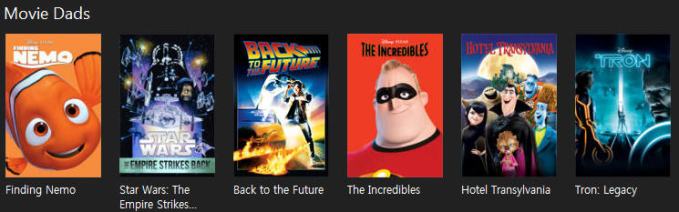
Just in time for Father’s Day idea! How do you want to celebrate the special day with your dad this year? Go to watch a movie with him! You can find many classic Father’s Day movies on iTunes Store, including Finding Nemo, Star Wars, Back to the future, The Incredibles and so on.
Now open iTunes, you will find Movie Dads list, and you can purchase or rent movies you want to watch. 
movie-dadsIf you have purchased or rented movies from iTunes Store, M4V Converter Plus is a good helper for you. Adopts advanced DRM decryption technique, it can strip DRM protection from any iTunes movies and convert DRM M4V to unprotected MP4. Keep 100% original quality of M4V with 5.1 audio tracks and subtitles retained.
With M4V Converter Plus, you can convert purchased iTunes movies  easily and keep iTunes rentals for longer time.
Main features of M4V Converter Plus
* Get rid of DRM protection from any iTunes M4V videos.
* Convert DRM M4V to unprotected MP4, AVI, MOV, FLV, MPEG, etc.
* 30X faster speed to convert HD movies without quality loss.
* Support various media tablets output.
* Customize the output video format according to your needs.
* Do a batch file conversion.
Pricing and Availability
Users can usually purchase M4V Converter Plus for Mac or Windows in $49.95. In order to celebrate Father’s Day, you can get M4V Converter Plus in $44.95 with 10% off discount. Just click the order link (http://m4vconverterplus.com/order.html ), you can enjoy special discount now.
About M4V Converter Plus Inc.
M4V Converter Plus Inc. is a software company that offers iTunes M4V video conversion solutions. With expertise and experience in iTunes video converter tools, its mainly products M4V converter software do well in converting m4v video you purchased or rent to QuickTime MOV, iPod, iPhone format with high speed and great quality.

Contact Info:
Name: Amy Green
Address: P.O. Box 1568, Cortaro, AZ, United States of America
Zip code: 85652
Email: market@m4vconverterplus.com
Website: http://m4vconverterplus.com/index.html

2016年4月22日星期五

All-in-one M4V to MP4 Converter -M4V Converter Plus

If you search on Google, you will find a series of M4V to MP4 Converter.  M4V Converter Plus with a lot of stable functions becomes the first choice.

M4V Converter Plus Overview

M4V Converter Plus is an all-in-one DRM removal software and iTunes video Converter. With it, users can legally remove DRM protection from any iTunes videos (iTunes Rentals included) and convert them to various video formats. For example, it can convert DRM-ed M4V to MP4, convert M4V to MOV, AVI, VOB, WMV, etc. It can also allow you to extract audio from iTunes M4V videos and export to MP3, AAC, WMA, FLAC, etc.
 
Besides, using this program, users can play iTunes M4V videos on any devices like iPhone SE, iPhone 6S, iPhone 6S plus, Samsung Galaxy S7, Google Nexus, Xbox 360, PS3, etc. This program green, powerful, can completely uninstall, easy to use.
 
M4V Converter Plus is a professional M4V to MP4 converter. It can support converting any iTunes video files, including iTunes movies, TV episodes and music videos. It can also convert iTunes movie Rentals to MP4 so that you can keep them for longer time.
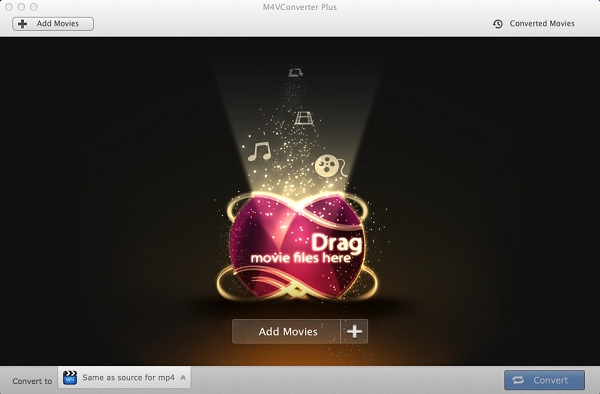
interface1
Interface of M4V Converter for Mac

How to use this M4V converter to convert M4V to MP4

1. Download the M4V to MP4 Converter, install and run it. 
2. Add M4V files from iTunes library into the application. 
Click Add Movies button in the main window. Choose the M4V videos files from iTunes playlist. Moreover, you can add many tasks at one time or drag these M4V files to the converter software directly. And then click Add.
3. Set MP4 as output format.
Click Convert to drop-down list to choose Same as source for mp4 as your output format. To have more exactly output files, you can set the parameters as needed.
4. Start M4V to MP4 conversion.
Click Convert button to begin converting M4V files to MP4. When the conversion finished, you can go to the Converted Movies folders to find the MP4 files. Now you can play the converted iTunes video anytime and anywhere.
To convert M4V to MP4, you can find more info at

2015年12月17日星期四

Star Wars: The Force Awakens Premiere on December 18, 2015

If you are a fan of iTunes movies, you will find the most downloaded films overall of iTunes 2015 is Star Wars Digital Collection.  Got the exciting news for you. The seventh installment in the main Star Wars film series returns to the big screen with Star Wars: The Force Awakens.  
The Force Awakens is scheduled for release on December 18, 2015, in 2D, 3D, and IMAX 3D, more than 10 years after the release of the franchise's last installment, Star Wars Episode III: Revenge of the Sith (2005). Now you can get the ticket from Star wars official website.
Star Wars: The Force Awakens Trailer (Official)

It was one of Hollywood's biggest nights ever as celebrities walked alongside stormtroopers for the premiere of Star Wars: The Force Awakens.
Star Wars Digital Collection Available on iTunes
Star Wars Digital Collection is the most downloaded film on iTunes of 2015. It went on sale from April this year. You can buy all six movies as a bundle for $89.99. And this new Star Wars collection is ideal for those who want to take the movies on your travel and enjoy the bundle with family.

You can also store the Digital Collection on non-apple tablets, smartphones or laptops. That might astonish you. How to do? 
How to play iTunes purchased movies Freely
Download and install M4V Converter Plus (Windows versionMac version), a smart iTunes purchased movies converter, as well as iTunes rentals converter program for personal use. 
Step 1: Import movie Star Wars Digital Collection from iTunes. M4V Converter Plus supports batch conversion, you can convert Star Wars Digital Collection at the same time.  
Step 2: Choose the ideal conversion video format according to your need.
Step 3: Due to M4V video encoding technology, just click Convert button, you can start iTunes purchased movies Star Wars conversion progress. 
And then you can transfer the converted Star Wars movies onto any mobile devices, including android smartphone, mobile tablets or laptops.  Now you can play purchased Star Wars  freely. 

2015年7月7日星期二

How to convert iTunes movie rentals & purchases to Facebook/Daily Motion/YouTube video list

Have you ever thought to upload your iTunes purchased movies to your Facebook, Daily Motion, YouTube? Want to own your iTunes movie rental and share them online?

The best M4V to web video converter – M4V Converter Plus can help you. With it, you can convert iTunes movie purchases & rentals to html 5 MP4 video, flash, SWF, and you can also convert iTunes protected M4V to YouTube, Facebook, Daily motion, Flickr and other video website compatible video format.

In addition, M4V Converter Plus is also a M4V to MP4/MOV/AVI/WMV/AAC/WMA Converter. With clean, simple, easy-to-use interface, it can remove DRM protection from iTunes movie purchases and rentals, then convert them to unprotected MP4/MOV/AVI/WMV/AAC/WMA, etc.

How to convert iTunes movie rentals & purchases to Facebook, Daily Motion, YouTube
STEP 1: Free download M4V Converter Plus.

STEP 2: Install and launch it, you will see the easy-to-use interface.


Interface of M4V Converter Plus for Win

After you have installed M4V Converter Plus free trial version, you can only convert 3 minutes of each videos you want to convert. If you have bought a license, and have got your key code. You may click here to read how to register to be full version.

STEP 3: Add the M4V files to convert

You can click the “Add Movies” button in the top-left to add the video files you want to convert. The software will open the iTunes movies library by default. Select the files and then click “OK“.

STEP 4: Set the output format

In the “Profile” drop-down list, the software supports multiple output formats, select the “Web video“. The video format you can choose include: Universal Flash Video Movie, Universal SWF video, Universal Flash F4V video, html 5 MP4 video, Facebook H264 video, Daily Motion H264 video, Flickr H264 HD video, etc. Of course, you can also set the output files parameter and other settings before conversion.


Output format settings


STEP 5: Click “Convert” to start converting M4V to web video .

M4V Converter Plus official website: http://m4vconverterplus.com/

System Requirement:
Windows XP or later version
Mac OS X 10.8 or later version


2015年3月4日星期三

Method to convert iTunes videos to Flickr video format

Flickr is an image hosting and video hosting website, and web services suite. More and more users use the Flickr to share videos and photos as a personal blog in the format of social media.
If there are some interesting and cool video clips of your purchased movies from iTunes Store, you want to extract it and share with others, how can we remove the DRM protection and extract video clips from the moves?
Don’t worry, M4V Converter Plus makes it easy and fast to solve. What you need are the purchased movies and the program – M4V Converter Plus. All the boring things can be removed and get what you need.
To add iTunes videos to Flickr, you just need to remove the DRM protection from iTunes videos and nothing to worry about video views. And removing DRM protection from iTunes video is so easy with M4V Converter Plus. It can display all iTunes videos according to the iTunes library including movies, TV Shows and music videos.
M4V Converter Plus can get rid of DRM from iTunes videos purchased or rented from iTunes Store. And you can set the Flickr video format before converting to suitable on Flickr.
How to extract iTunes video clips for Flickr.
First of all, go to download the latest verion of the M4V Converter, after the installation, run the software.
Step 1.  Add iTunes video to M4V Converter Plus
Click "Add Movies" button and choose a video listed in the pop-up window. Then click "Add".
Step 2.  Choose the Flickr video format
Click "Convert to" drop-down list and choose “Flickr H264 HD Video” as the output format.

Step 3.  Start conversion on Mac.
Click "Convert" button to open the converting box and start converting.

After conversion is done, you can get the iTunes videos with the Flickr format. Then you can upload the iTunes video and share on Flickr. 
More output presets you can view via http://m4vconverterplus.com/howto-and-guides/index.html

2015年2月27日星期五

How to play iTunes music video on Android Phone

When your favorite singer has released a new album recently, you can’t wait to purchase the newest music video from iTunes Store. The dances are awesome in the MV. So you also want to share the wonderful MV with your dance-loving friends. But can't play the iTunes music video on their Android Phones?
At first, you need to know the purchased iTunes video has been encrypted by the Apple's DRM copyright protection. Apple use DRM M4V in iTunes store to avoid copyright infringement. You can only play protected M4V files on authorized computers and Apple devices.
Don't worry. With M4V Converter Plus for Win, after the conversion, your M4V files without DRM protection can be played on Android Phones and the other a variety of media players like VLC media player etc. M4V Converter Plus is a full-featured application to convert iTunes purchases and rentals including Movies, TV Shows and music videos. You can retain the original chapters, multiple audio tracks and subtitles. You can follow the simple steps to convert iTunes video to play on Android phone.
Add iTunes music video
Click the Add Movies button to open the adding window and choose Music in the Sources list. Select one iTunes music video and click OK button to add.

Set Android output format
Click Convert to list to choose Android Device and select one appropriate output format.

Start the conversion
After upper settings, just click Convert button to start the conversion to convert iTunes music video to Samsung Galaxy Note 3 format.

You can click Open Folder button to check the output file during the conversion. And you can also check the output file in the history list after the conversion. The history can record the converted profiles and files. It is convenient for you to arrange your converted files.
Now you can see M4V Converter Plus can get rid of the DRM protection while converting. It can convert iTunes M4V videos to a variety of output formats like MP4, MOV, AVI, FLV, WMV etc with good output quality and high conversion speed. Besides as a good DRM Removal and Converter, M4V Converter Plus can customize duration to clip the video. It supports customizing which chapters or audio tracks to save. 
Download M4V Converter Plus for Mac and Win to have a try from here. You will find M4V Converter Plus always can help you a lot.

2015年1月4日星期日

How to remove audio from iTunes video

When you download some interesting videos from iTunes store and want to re-dub in them and send them to friends. It is quite necessary to remove audio and get only video stream as an output. 
Sometimes your movie comes with 2 or more audio tracks and you only want one in the video. So you can remove the unnecessary audio tracks from video.
This is not so easy to do this. Because the videos purchased from iTunes store are protected by DRM protection. You need to remove DRM protection from videos at first to play without any restrictions on computers and mp3 players. Then you can remove the audio from the video and add the new one. But sometimes you need to remove audio from video completely instead of mute the audio of source video.
Thankfully, M4VConverter Plus can be used for these purposes. As a powerful DRM removal, M4VConverter Plus can easily remove DRM and remove audio track from M4V video files.
M4VConverter Plus can solve the task with 3 simple steps.
Step 1: Add a movie
Click the Add Movies button to open the adding window, select one movie on the Movies tab and click the Add button to add.

Step 2: Remove the audio
If you need only video stream as an output, click the audio settings drop- down list to choose the option Disable Audio to remove the audio.


Step 3: Start the conversion
Click the button Convert to open the converting box to start converting.

After the conversion is completed, you can play the output video and check the track info with MplayerX. The video without DRM protection can play well on the player and the info shows that all audio tracks have been removed successfully from video with M4VConverter Plus. And you can use the same steps to save one audio track.
Actually, M4VConverter Plus is an excellent and easy-to-use M4V converter, which can convert movies to remove the DRM protection with perfect output quality and high conversion speed.

More info about M4VConverter Plus to visit: http://www.m4vconverterplus.com