2017年7月11日星期二

Spider-Man: Homecoming Review

Spider-Man: Homecoming is a 2017 American superhero film based on the Marvel Comics character Spider-Man, co-produced by Columbia Pictures and Marvel Studios, and distributed by Sony Pictures Releasing. It is the second reboot of the Spider-Man film franchise and the sixteenth film of the Marvel Cinematic Universe (MCU).
Spider-Man-Homecoming-Tom-Holland

Spider-man: Homecoming Summary

Thrilled by his experience with the Avengers, young Peter Parker returns home to live with his Aunt May. Under the watchful eye of mentor Tony Stark, Parker starts to embrace his newfound identity as Spider-Man. He also tries to return to his normal daily routine -- distracted by thoughts of proving himself to be more than just a friendly neighborhood superhero. Peter must soon put his powers to the test when the evil Vulture emerges to threaten everything that he holds dear.

spider-man-homecoming

Spider-man: Homecoming Review

Spider-Man: Homecoming was released in the United States on July 7, 2017, in 3D, IMAX and IMAX 3D. Homecoming has grossed over $256 million worldwide, and received positive reviews, with critics praising Holland and the other cast's performances, the light tone, and the high school setting.  Here you can see the top review of Spider-Man: Homecoming at Rotten Tomatoes site.

spider-man-homecoming-review
  • An utter gas, a fast and very funny superflick that inserts Spidey into the larger Marvel Cinematic Universe without ever losing sight of what makes him unique and beloved. - by Christopher Orr, The Atlantic
  • What are the odds that a film with six credited screenwriters and a director (Jon Watts) with more Onion content than anything else could recapture the youthful thrill of superhero movies in general and the youthful appeal of Spider-Man in particular? - by Matthew Lickona, San Diego Reader
  • The movie's not flawless, but it is fun, a big improvement on the non-wowing The Amazing Spider-Man and its sequel of recent years. - by Peter Howell, Toronto Star
  • The most faithful version to the comics of the beloved Marvel character with a diverse cast and a tone and vision that move away from the common MCU. - by Orlando Maldonado, Movie Network
  • It works best when it sticks close to Peter Parker and is content to be a good-natured story of a teenager who’s navigating through the competing demands of school, home and his emergent Spidey self. - by Manohla Dargis, The NYTimes
  • The characters and scenarios are familiar, but this is a loose, cool, funny remix that makes them feel fresh again. Plus, it’s mercifully short on life lessons from Aunt May. - By Nick De Semlyen, Empire

Play Spider-Man: Homecoming full movie freely

The movie Spider-Man: Homecoming is available to pre-order in iTunes Store. You can purchase the movie in advance, and you will get the full movie before long. Likewise, you can also purchase or rent other Spider-Man films.

pre-order-spider-man-homecoming
You can play iTunes movies on iPhone, iPad and Apple TV. With M4V Converter Plus, you can play iTunes movies freely. Why? That's because M4V Converter Plus can convert any iTunes videos to unprotected MP4, MOV, M4V, FLV, WMV, AVI and other video formats. In this way, you can watch iTunes movies anytime and anywhere.
The following guide is to tell you how to play iTunes movie like Spider-Man freely for Mac and Windows user.
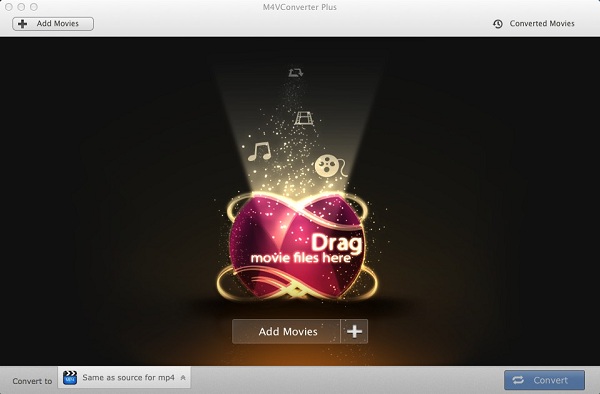
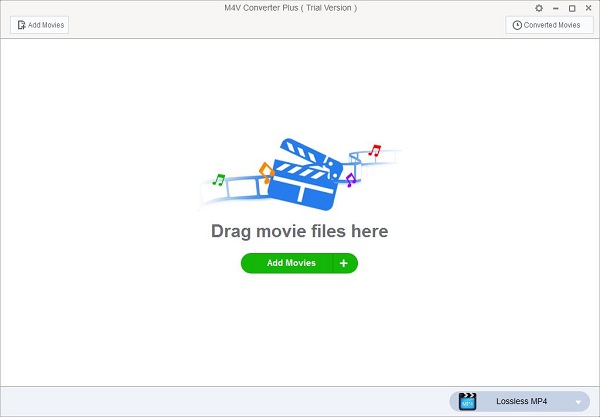
Step 1. Free download M4V Converter Plus by clicking the download button below according to the platforms you own, install and launch the program on PC. You can see the clean and simple user interface as below.

download-win   download-mac
interface1
interface
Note. M4V Converter Plus has free trial version, which can only support one minute for each iTunes video file. To get the full version by clicking here.
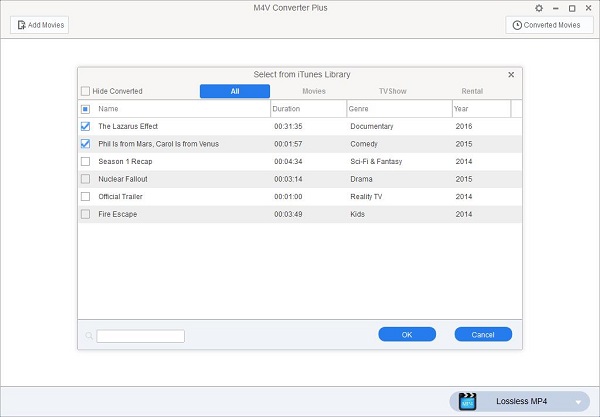
Step 2. You can drag and drop the iTunes movies to the program directly.  Or click Add Movie button to add the iTunes movies you want to convert.
add-movies
add
Step 3.  Set output format.
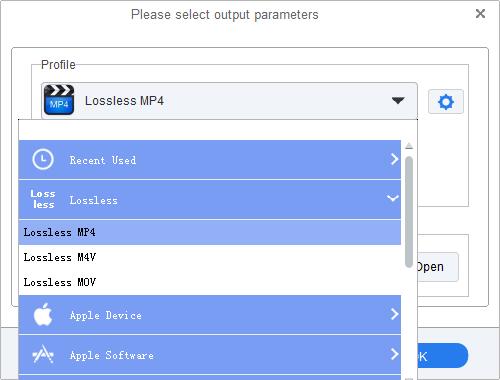
For Windows users, click the blue profile panel to select output format. You can also choose Lossless MP4 / MOV / M4V.
lossless-mp4
For Mac users, click Convert to drop-down list, choose Same as source for mp4/mov.
mp4-output
Step 4.  Finally, start the conversion.
Windows users click the blue panel again, and Mac users click Convert button. The program will do the rest for you automatically.
download-win   download-mac

2017年7月10日星期一

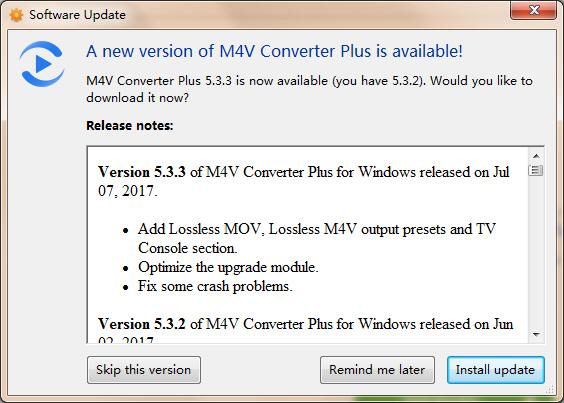
M4V Converter Plus for Win new V5.3.3 Now Support More Output Profile

M4V Converter Plus for Win rolled out its new version 5.3.3, which can support new more output format Lossless MOV and Lossless M4V, Add TV console section with some crushes fixed.
mcp-win5.3.3
M4V Converter Plus Inc. introduced its new version 5.3.3 of M4V Converter Plus for Windows. The new release comes with a lot of exciting new features. Here are some of the top new and improved features of M4V Converter Plus for Win V5.3.3.

What’s new in M4V Converter Plus for Win V5.3.3

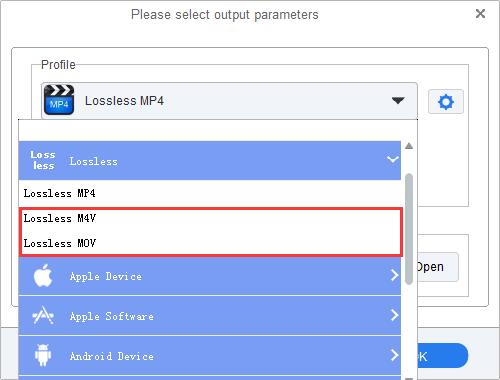
At first, with this new release, you can convert iTunes movies, TV Shows and music videos to Lossless MOV, unprotected Lossless M4V. Just added the iTunes videos you want convert to the program, and set output format as Lossless MOV or Lossless M4V by clicking the blue profile panel. Click profile again, you can find the conversion will begin with 20X faster speed.
lossless-mov-m4v
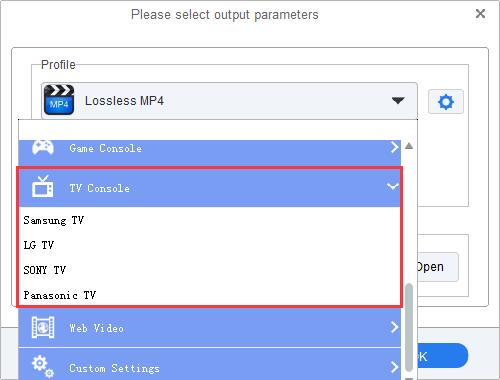
Besides, this new version also adds TV console option, including the new presets for Samsung TV, LG TV, Sony TV and Panasonic TV. You can convert iTunes videos to Lossless MP4 for your TV, you can also select it from TV console as TV brand you have.
tv-console
It fix some crashes in some circumstances to make the new version more stable and run faster.
All-in-one DRM Removal software and iTunes Movie Converter
M4V Converter Plus for Win is a professional iTunes DRM M4V Converter, which can decode DRM protection by converting iTunes protected M4V videos to Lossless MP4, MOV, M4V, Customized AVI, FLV, WMV, 3GP and other video or audio formats.
With it, you can also upload iTunes movies clip to YouTube, Facebook and Daily Motion. Besides, you can convert iTunes movies or TV Shows to play on non-Apple devices, including Samsung Galaxy S8, iPhone 7, HTC U11, Huawei Honor 9, OnePlus 5, PS4 Pro, Xbox One, Samsung Smart TV and so on. It can woke on Windows 7, 8 and 10 perfectly with the latest iTunes 12.6.1 installed.
Pricing and Availability
M4V Converter Plus for Win is currently sold $44.95 from original $49.95 at MCP Inc. official website. Users can download the trial version by clicking the link
http://www.m4vconverterplus.com/M4VConverterPlus.exe . For more info about M4V Converter Plus for Mac, please go to http://m4vconverterplus.com/.
About M4V Converter Plus Inc.
M4V Converter Plus Inc. is a software company that offers iTunes M4V video conversion solutions. With expertise and experience in iTunes video converter tools, its mainly products M4V converter software do well in converting m4v video you purchased or rent to QuickTime MOV, iPod, iPhone format with high speed and great quality.
Contact Info:
Name: Amy Green
Address: P.O. Box 1568, Cortaro, AZ, United States of America
Zip code: 85652
Email: market@m4vconverterplus.com
Website: http://m4vconverterplus.com/index.html
More related topics
How to convert iTunes m4v videos to Samsung Smart TV
M4V Converter Plus for Win new version 5.3.3

2017年7月4日星期二

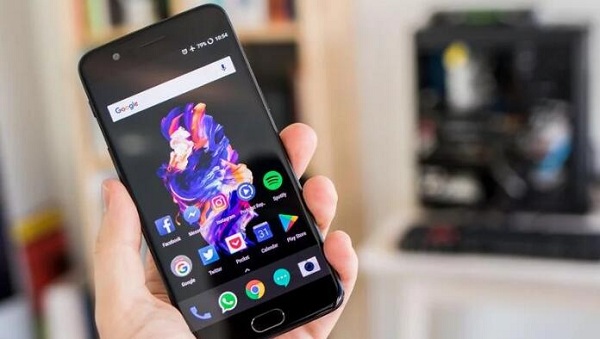
Honor 9 vs. OnePlus 5: What is the difference

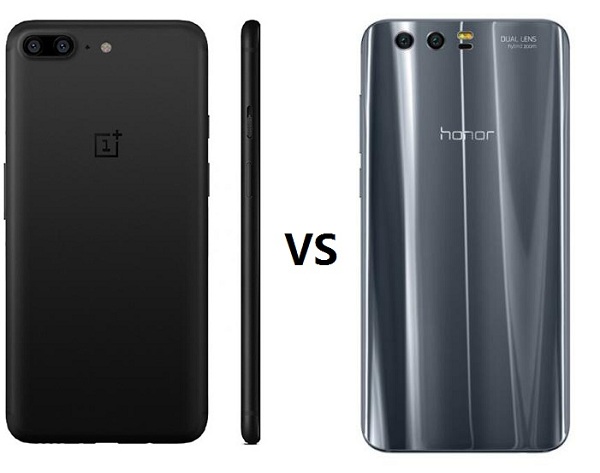
OnePlus and Honor have always been rivals, but this year sees the two brands going head-to-head more directly than ever before. With the OnePlus 5, the company focuses on high-end specs, including a ridiculous 8GB of RAM, alongside a new dual camera setup. And the Honor 9 builds on its predecessor with a few meaningful upgrades of its own, including a beautifully curved glass back panel and an enhanced dual camera system.
 
Both phones hover either side of the £400 mark — the OnePlus 5 starts at £449, while the Honor 9 undercuts it at £379. 
 
oneplus-5-vs-honor-9
 

Huawei Honor 9 vs OnePlus 5

CategoryHonor 9OnePlus 5
Operating SystemAndroid 7.0
EMUI 5.1
Android 7.1.1
OxygenOS 4.5
Display5.15-inch 1080p IPS LCD
Gorilla Glass 3
5.5-inch Optic AMOLED
Gorilla Glass 5
CPUHuawei Kirin 960Qualcomm Snapdragon 835
RAM4GB or 6GB6GB or 8GB
Internal Storage64 or 128GB64 or 128GB
microSDYes (Hybrid slot)No
Battery3,200 mAh3,300 mAh
Quick charging9V / 2ADash Charge
Rear camera12MP (RGB) + 20MP (monochrome), f/2.216MP (f/1.7) + 20MP (f/2.6, telephoto)
Front camera8MP, f/2.016MP, f/2.0
Water resistanceNoNo
Dimensions147.3 x 70.9 x 7.45 mm
155 g
154.2 x 74.1 x 7.25 mm
153 g

What's the difference between Honor 9 and OnePlus 5

Huawei Honor 9 comes with a 5.15-inch touchscreen display with a resolution of 1080 pixels by 1920 pixels at a PPI of 428 pixels per inch. It runs Android 7.0 and measures 147.30 x 70.90 x 7.45 (height x width x thickness) with 155 g weight.
 The OnePlus 5 comes with a 5.5-inch 1080p AMOLED touchscreen display covered in Gorilla Glass 5 with a standard 16:9 aspect ratio.
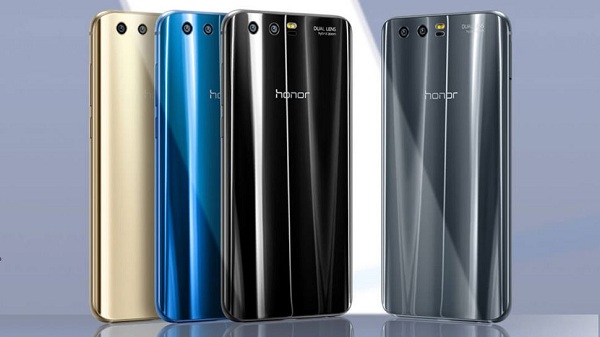
The Huawei Honor 9 is a dual SIM (GSM and GSM) smartphone that accepts Nano-SIM and Nano-SIM. Connectivity options include Wi-Fi, GPS, Bluetooth, NFC, FM, 3G and 4G (with support for Band 40 used by some LTE networks in India). Sensors on the phone include Proximity sensor, Accelerometer, Ambient light sensor and Gyroscope. It comes in Glacier Grey, Sapphire Blue, Midnight Black and Gold.
huawei-honor9
The OnePlus 5 runs Android 7.1.1 and is powered by a 3300mAh non removable battery. It measures 154.20 x 74.10 x 7.25 (height x width x thickness) and weigh 153.00 grams. It is a dual SIM (GSM and GSM) smartphone that accepts Nano-SIM and Nano-SIM. Connectivity options include Wi-Fi, GPS, Bluetooth, NFC, USB OTG, 3G and 4G (with support for Band 40 used by some LTE networks in India). Sensors on the phone include Compass Magnetometer, Proximity sensor, Accelerometer, Ambient light sensor and Gyroscope.
oneplus-5-colors

Play iTunes Movies on Honor 9 and OnePlus 5

Honor 9 and OnePlus 5 are the best android phone you can choose of 2017.  And you can switch your iPhone to Honor 9 or OnePlus 5. By the way, you may have a lot of iTunes movies or TV Shows and want to play them on your Android phone such as Huawei Honor 9 or OnePlus 5.
As we all know, movies you purchase or rent from iTunes are M4V formats with DRM protection, which prevent you playing on other non-Apple devices. To play iTunes movies on Honor 9 or OnePlus 5, you should remove DRM firstly.

Remove DRM and Play iTunes Movies With M4V Converter Plus

M4V Converter Plus is recommended for you. It is one of the best iTunes DRM removal software and get rid of Apple DRM protection legally.
Besides, it is also an all-in-one iTunes Movies Converter. With it, you can easily convert any iTunes movies to plain MP4, 3PG, WMV, FLV, AVI and other video files supported by Android phones with 30X faster conversion speed. And the 5.1 Audio Track and Subtitles are kept.
M4V Converter Plus is compatible with Mac and Windows platforms. You can download the program by clicking the links below as you need.
********************************************************************************
Free Download M4V Converter Plus for Mac
Download M4V Converter Plus for Win here
********************************************************************************

Step by Step Guide of Converting iTunes Movies 

Step 1. Install and Launch the program on your computer. iTunes will be opened automatically.
Interface of M4V Converter Plus for Mac
interface
Step 2. Import movies you want to watch to the program by clicking Add Movies button.
add-tv-shows
add
Note: M4V Converter Plus support converting any iTunes videos, including iTunes purchased movies, Rentals, TV Shows, iTunes Extras (Mac), iCloud and music videos.
Step 3. After the movies added, you can set output format.  Here we can select MP4 as output format. Because MP4 is the best video format for Android phone.
For Mac users, click Convert to profile list to choose Same as source for mp4 as output format.
mp4-output
For Windows user, Lossless MP4 is the default output format on the blue Profile panel.
add
Step 4. Start the iTunes movies to MP4 conversion.
To begin the conversion, Mac users can click Convert button, and Windows users should click the blue profile panel again.

Related Topics:

Convert and Transfer iTunes M4V videos to Huawei Honor 9 for watching
To Play iTunes movies or TV shows on OnePlus 5
How to Convert iTunes Videos to Samsung Galaxy Note
How to Transfer iTunes Movies to Samsung Galaxy S8 and S8 Plus

2017年6月28日星期三

Best Android phone You should buy (2017 June)

The Android market is fiercely competitive. With brands like Google, LG, Samsung, HTC, and OnePlus all competing for a share of the pie, it’s no wonder that Android fans are every bit as loyal as Apple fanboys, if not more. But there are a lot of differences between all the smartphones. Here, we’ve compiled a list of the best Android smartphones by category to help make your buying decision even easier.
android-smartphone

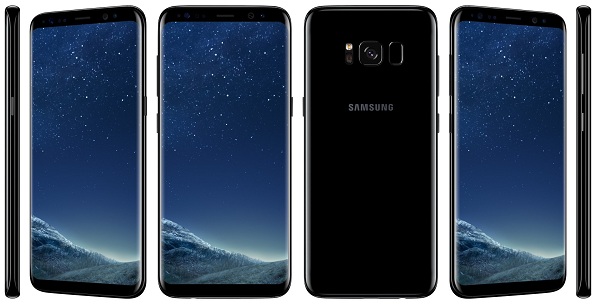
Best Overall - Samsung Galaxy S8

The Galaxy S8 has slick new hardware with tiny bezels that let it have a big screen in a small body, but inside it still offers everything you want: a high-end processor, lots of storage, an SD card slot, full waterproofing and a top-end camera.
Yes the fingerprint sensor is slightly awkward to use, but the Galaxy S8's iris scanner is dramatically improved to make up for it. And it only takes one look at the industry-leading display to start to forgive Samsung's decisions on the back.
Samsung-Galaxy-S8
Though its software can be a little overwhelming to novices, you can't argue that Samsung continues to pack in hundreds of features to a single phone, making sure there's something in here for everyone's needs. Samsung continues to take this approach of offering more more more with just a few compromises — and it continues to work.
Bottom line: The Galaxy S8 gives you piles of features in a beautiful body, and is a great choice for a wide range of potential buyers.
One more thing: Of course, you can always pay a little extra and get the larger Galaxy S8+ for a bit more screen and battery life.

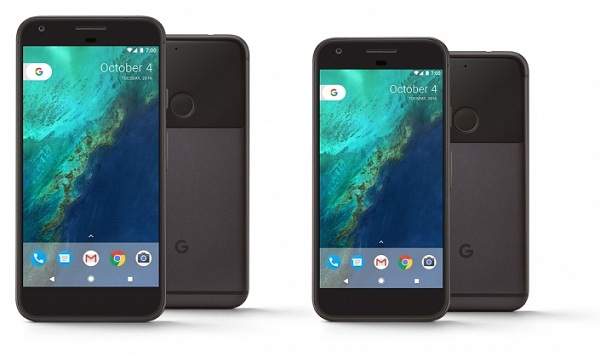
Best Google Experience - Google Pixel XL 

The Google Pixel XL does almost everything right. Its metal body is well-built and easy to grip, and its spec sheet is still capable, featuring a Snapdragon 821 and 4GB of RAM powering its 5.5-inch QHD display
But the Pixel XL really makes its case because Google owns both the hardware and the software. Even the best manufacturers can't achieve what Google has with its first-party powerhouse. It's fast, clean and lovely to use with Google's apps and services. The downside is the Pixel can't match the others in terms of raw features.
pixel-xl
Then there's the camera, which continues to be one of the best in the business, helped along by Google's exemplary electronic stabilization that gives you silky smooth video recording.
Bottom line: Google doesn't compete in the raw number of features, but offers a sleek, consistent and holistic experience that absolutely deserves praise.
One more thing: The Pixel is available unlocked through Google's store in most countries, but if you're in the U.S. we suggest considering buying through Google Fi.

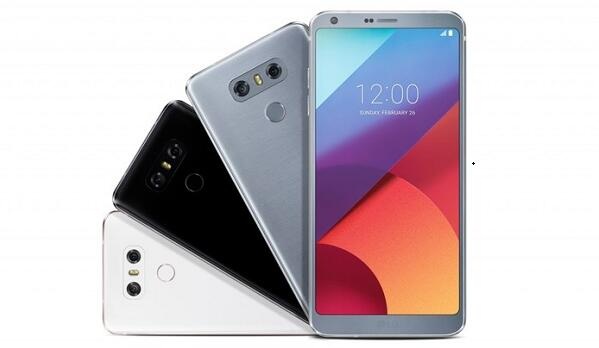
Best For Less - LG G6

The LG G6 uses a tall 18:9 display and tiny bezels (hey, it even came out before the Galaxy S8) to give you a larger screen in a smaller body. The all-new metal-and-glass design may not be totally inspired, but it's built amazingly well and incorporates lots of little features — like waterproofing — to help it hold up over time.
All of the internal specs you expect are here, even though the battery isn't removable like its predecessors. The one downside here is regional differences: the higher-quality Quad DAC is exclusive to Asia, while wireless charging is only for the North American market.
lg-g6-colors
LG's dual camera setup has returned but with a refined emphasis on the wide-angle camera so it packs the same sensor as the standard camera. The main camera takes fantastic photos to go toe-to-toe with the best of them, and the wide-angle shooter adds in something that no other phone offers.
Bottom line: This is LG's best flagship phone to date, and going a step further it's one that comes in at a notably lower price — around $500 now — than the Galaxy S8 and Google Pixel XL.
One more thing: Shop around a bit before buying, as different retailers and carriers can have varying pricing schemes.

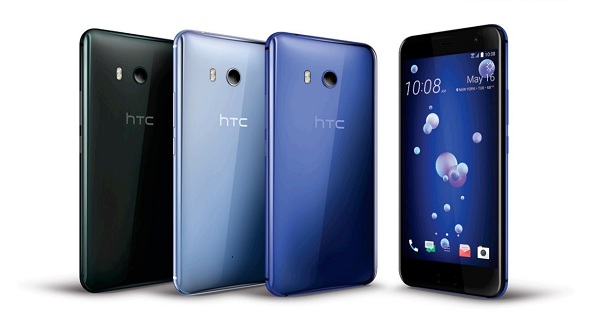
Best Alternative - HTC U11 

HTC is back at the top competing with the big names after a few years where its flagships just weren't up to speed. The HTC U11 is a great overall phone that has followed industry trends and also executed really well on them.
When viewed from the back you get a beautiful shining glass back that's truly unique. Around front it's a bit more boring, but the 5.5-inch QHD display is a strong panel — and the fingerprint sensor is sensibly located below the screen.
htc-u11
The best example of HTC turning things around is its camera — the 12MP sensor gets all the hardware right, and also has the processing to take best-in-class photos.
Internally you get all of the right stuff, with a Snapdragon 835 processor, 4GB of RAM, 64GB storage, a big-enough 3000mAh battery and complete waterproofing. The one thing missing? A headphone jack on the bottom.
Bottom-line: The U11 is a great all-around phone at a reasonable $650 price that should definitely be considered in the same realm as other high-end options.
One more thing: This is the only phone on this list without a headphone jack — be ready to use Bluetooth or the included USB-C adapter.

Best For Speed - OnePlus 5

OnePlus continues to iterate on its proven formula of offering a phone with top-end internal specs, great software and no obvious flaws for a really competitive price. The OnePlus 5 is blazing fast, has super-clean software and solid battery life.
At this discounted price you get hardware design that's rather simple, a good-but-not-great screen and a simply above-average camera — plus, it's missing waterproofing. OnePlus continues to do well with all of the basics, though.
oneplus-5
Even at a slightly higher price of $479, the OnePlus 5 is a great deal in 2017 — especially for those who can't (or won't) spend $600+ on one of the flagship options.
Bottom-line: For a solid experience and future-proof specs for a lower price than the flagship competition, the OnePlus 5 is a great choice.
One more thing: Remember you won't get Verizon or Sprint compatibility on the OnePlus 5 — you'll have to stick to GSM/LTE networks.

Conclusion

This article was reposted from androidcentral. For most people, the Galaxy S8 will serve as the best possible choice with its excellent design, top-end hardware, great camera and piles of software features. It's hard to go wrong with this phone, whether you're choosing the Galaxy S8 or the larger Galaxy S8+.
All of the above data was collected by June 2017. M4V Converter Plus is one of the best software developer dedicated to providing iTunes DRM removal solutions to worldwide customers. With it, you can remove DRM protection easily and convert iTunes movie purchases, Rentals and TV shows to popular android smartphones. And we will continually supply the movie and tech news for you. Please continue to pay attention to us.

Related topics

How to Transfer iTunes Movies to Samsung Galaxy S8 and S8 Plus
How to Convert iTunes Movies to OnePlus 5 
LG G6 Review and Watch iTunes movies on LG G6
How to Transfer and Play iTunes Movies on HTC U11
How to Play iTunes movies on Google Pixel and Pixel XL at will
How to Remove DRM Protection from iTunes Movies

$0.99 movie rental of the Week on iTunes - lion 2016

You can rent the movie Lion (2016) in $0.99 from iTunes Store. That's to say, you can get the Lion full movie in 99 cents easily. You can see the movie official trailer below.


Lion (2016) Movie Summary 

Lion is a 2016 biographical film directed by Garth Davis (in his feature debut) and written by Luke Davies, based on the non-fiction book A Long Way Home by Saroo Brierley with Larry Buttrose. The film stars Dev Patel, Rooney Mara, David Wenham and Nicole Kidman.
lion-2016
Five year old Saroo gets lost on a train which takes him thousands of miles across India, away from home and family. Saroo must learn to survive alone in Kolkata, before ultimately being adopted by an Australian couple. Twenty-five years later, armed with only a handful of memories, his unwavering determination, and a revolutionary technology known as Google Earth, he sets out to find his lost family and finally return to his first home.

Lion (2016) Movie Review

If you are human, there is no way that Lion won't move you. This movie get a lot of good movie reviews listed below.
lion-sunny-pawar
  • "Lion" is a complex movie, with its profound themes of home and identity, and its tonally disparate halves. A smartly understated approach to Brierley's story holds it all together. – Stephanie Merry, Washington Post, Dec 23, 2016
  • Lion is a beautifully told, uplifting story of courage and determination. – Richard Roeper, Chicago Sun-Times, Dec 23, 2016
  • Lion represents a commitment from those involved and, flaws aside, it's an amazing tale of resilience and determination. – James Berardinelli, ReelViews, Dec 27, 2016
  • Its themes are universal. Everyone has a home, and everyone feels connected to it, no matter how far they travel. – Adam Graham, Detroit News, Dec 23, 2016
  • Lion represents a commitment from those involved and, flaws aside, it's an amazing tale of resilience and determination. - James Berardinelli, ReelViews, Dec 23, 2016

How to Rent Lion 2106 from iTunes Store

iTunes offers the weekly $0.99 movie rental - Lion (2016) via the iTunes Store.
How to find the $0.99 iTunes rental and rent it? Just launch the iTunes, and  pull down the window, you will find the Limited- Time Prices. You will find the Movie of this week ($0.99 Rental).
limited-time-price
lionNow click the movie Lion, and you will find the Rent section under the Buy button. Click on the rental price and enter your Apple ID password if required.
If you rent Lion 2016 movie on your Mac or PC, you can watch it on your computer or sync it to your iPhone, iPad, or iPod. You can sync your iTunes rental back and forth between your iOS device and computer, but it can only be on one device at a time. If it's on the computer, you'll see a tab for Rented Movies you can click on.
After you start to playing the rented movie, you have just 24 hours to finish it (in the U.S.; it's 48 hours in the rest of the world). If you don't finish watching in that time, the movie will expire and you'll need to rent it again. Besides, You have 30 days from the day you rented the movie to watch it.


Watch Lion 2016 full movie freely with M4V Converter Plus

If you want to keep iTunes rent movies longer, you can go to try M4V Converter Plus. It is a powerful iTunes Rental Converter for Mac and Windows users. With it, you can convert iTunes rented movies to almost popular mobile devices you own. Now see the detailed tutorial below to tell you how to remove DRM and convert iTunes rent movies to unprotected video formats as you need.
Step 1. Download M4V Converter Plus, install and launch it on your computer. You can see the clean and simple user interface as below.
Note. It compatible with Mac and Windows platforms. You can download it by clicking the download button below according to the platforms you use.
download-win   download-mac
interface1
interface
Step 2. Import the rent movie Lion 2016 to the program by clicking the Add Movies button.
add-rentals
add-rentals
Step 3.  Set output format.
For Windows users, click the blue profile panel to select output format. You can also choose Lossless MP4 by default.
mp4-output2
Mac users can click Convert to drop-down list, choose Same as source for mp4/mov.
mp4-output
Step 4. Start the iTunes rent movie to MP4 conversion. There is a little different between Mac and Windows platform.
Windows users click the blue panel again, and Mac users click Convert button. The program will do the rest for you automatically.

Related Topics

Remove 24 hours' Limitation for iTunes Rented Movies
Everything you need to know about iTunes Rentals
How to Convert iTunes Purchased movies easily

2017年6月21日星期三

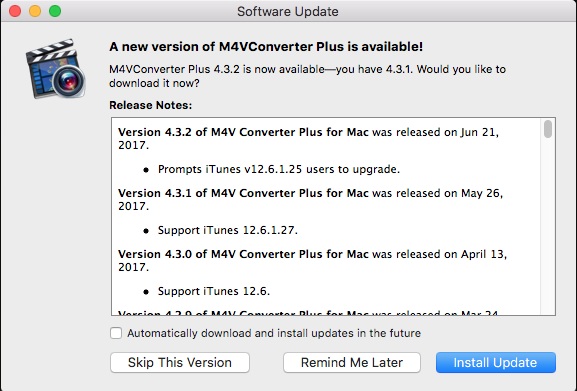
M4V Converter Plus for Mac has released its new version 4.3.2


M4V Converter Plus for Mac has been released its version 4.3.2 on June 22, 2017. When the iTunes version is V12.6.1.25, the user is prompted to upgrade.

upgrade-itunes


The new version 4.3.2 can work on iTunes 12.6.1.27 perfectly. However, please note that the program doesn’t support iTunes v12.6.1.25 only. So if you are still running iTunes 12.6.1.25 or previous version, it will pop up the window to prompt users to upgrade its iTunes to new version.
Users should download and install the latest iTunes to make sure the program is working properly. Then try M4V Converter Plus for Mac again.
Download M4V Converter Plus for Mac

M4V Converter Plus for Mac Overview

M4V Converter Plus for Mac is a powerful iTunes DRM removal software as well as iTunes Movie Converter. With it, you can strip Apple DRM protection from iTunes videos legally. Besides, you can also convert protected M4V videos to standard video or audio formats such as MP4, AVI, MOV, FLV, WMV, MP3, AAC, WMA, etc.
What’s more, it provides various output preset, including Samsung Galaxy S8, iPhone 7, HTC 10, LG G6, Huawei P10, OnePlus 4, PS4 Pro, Xbox One and other non-apple devices. The Mac version support converting iTunes purchased movies, rented movies, TV Shows, music videos and iCloud files at faster conversion speed with high output quality kept.
It can compatible with Mac OS X 10.8, 10.9, 10.10 OS X 10.11 EI Capitan and 10.12 Sierra perfectly.

Pricing and Availability

M4V Converter Plus for Mac is currently available for $44.95 from MCP Inc. official website.  New version 4.3.2 is available to download for any users. New users can get the free trial version with the following link http://www.m4vconverterplus.com/M4VConverterPlus.dmg . Old users can check update automatically. Further info about M4V Converter Plus for Mac, please
visit http://m4vconverterplus.com/.
mcp-4.3.2

About M4V Converter Plus Inc.

M4V Converter Plus Inc. is a software company that offers iTunes M4V video conversion solutions. With expertise and experience in iTunes video converter tools, its mainly products M4V converter software do well in converting m4v video you purchased or rent to QuickTime MOV, iPod, iPhone format with high speed and great quality.
Contact Info:
Name: Amy Green
Address: P.O. Box 1568, Cortaro, AZ, United States of America
Zip code: 85652
Email: market@m4vconverterplus.com
Website: http://m4vconverterplus.com/index.html

2017年6月20日星期二

HTC U11 vs Google Pixel XL: Which should you buy?

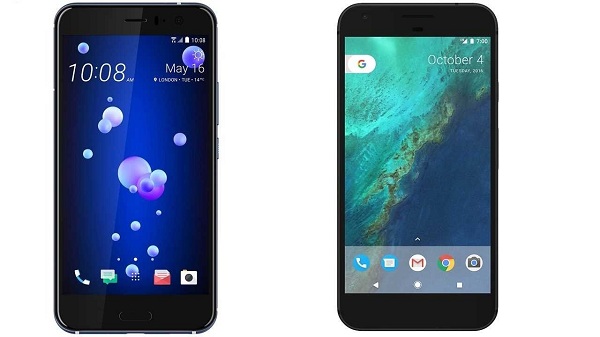
HTC U11 and Google Pixel XL both made by HTC, pack similar display sizes, high performance and phenomenal cameras. But there's a big price difference between the Google Pixel XL ($769), and HTC U11 ($649)  and you'll also be getting a significantly different software experience. So which should you buy? Let's take a look at some of the major points of divergence between two of the top Android phones of the moment.
htc-u11-vs-pixel-xl

HTC U11 Review and play iTunes movies on HTC U11

Google Pixel XL Review and Watch iTunes videos on Pixel XL

HTC U11 vs Google Pixel XL: Designs and Display

The two phones offer unique and interesting designs. The Google Pixel has a half-glass back that certainly is unique, though it didn’t have mass appeal. The HTC U11 boasts a shiny glass back design with a gorgeous range of colors. The phone features sleek, rounded corners and edges with HTC’s Edge Sense, which allows you to control the phone by squeezing it. There is something missing from the HTC U11 - a headphone jack, something the Google Pixel offers.
htc-u11
When it comes to the display, there are a few things to consider — type of display, size, and resolution. The Google Pixel offers a 5-inch display with a resolution of 1,080 x 1,920 pixels, with a pixel density of 441 pixels-per-inch (ppi). The 5.5-inch HTC U11, on the other hand, offers a resolution of 1,440 x 2,560 pixels, with a pixel density of 534 pixels-per-inch. To be fair, Google does offer the 5.5-inch Pixel XL, which has the same resolution and pixels per inch, though it’s more expensive than the regular Pixel.
pixel-xl

HTC U11 vs Google Pixel XL: Battery life and charging

While the Google Pixel offers a battery capacity of 2,770mAh, the HTC U11 goes a step further with a capacity of 3,000mAh. Capacity isn’t the only thing to consider here — because of the bigger screen with a higher resolution, the Pixel will last a little longer than the U11. That’s direct from Google and HTC — Google lists the Pixel as offering up to 26 hours of talk time, while HTC says the U11 will last 24.5 hours. That alone the Pixel the winner.
When it comes to charging, things are a little different. The HTC U11 offers Quick Charge 3.0, while the Google Pixel offers “Fast Charging.” We don’t yet know exactly how quickly Quick Charge 3.0 will charge the HTC U11, but the Pixel will give you 7 hours of use with 15 minutes of charging.
Because of the longer life on a single charge, the Google Pixel wins this category.

HTC U11 vs Google Pixel XL: Camera

When the Google Pixel first launched, it was hailed as having one of the best cameras out there. Can the HTC U11 dethrone it? The rear-facing camera on both phones is 12-megapixels, however the Pixel’s sensor has an f/2.0 aperture, while the HTC U11’s sensor has an f/1.7 aperture. That means that the U11 should be slightly better in low-light situations. On top of that, the U11 offers optical image stabilization, while the Pixel does not. Both phones offer dual-LED flashes.
htc-u-11-header
Regardless, the Pixel is our favorite smartphone camera. HTC told us it expects the U11 camera to be slightly better than the HTC 10, which currently sits one point below the Pixel on DxOMark. We’ll have to wait and see, but the U11 just might beat the Pixel.
When it comes to the front-facing camera, things are a little less competitive — while the Google Pixel has an 8-megapixel front-facing camera with an f/2.4 aperture, the U11’s front-facing camera has a whopping 16-megapixels, which should be very helpful for the selfie-lovers out there.

HTC U11 vs Google Pixel XL: Software

Both of these two phones use the latest and greatest Android Nougat, which offers excellent features like improved multi-tasking, useful notification bundling, and more. The HTC U11, however, has some special features built-in as well, making it a little different for those who are interested.
For example, the device offers HTC Sense, the company’s Android overlay. Sense has evolved quite a lot over the years, and it’s now a lot less intrusive than it was a few years ago. The device will come with a few HTC-specific apps, but apart from that, HTC’s phone’s are now pretty similar to stock Android.
As a part of the bundled features, the HTC U11 comes with HTC Sense Companion, which is HTC’s digital assistant. Unlike Google Assistant, Sense Companion is not a voice assistant. Instead, it anticipates your needs using things like your calendar, your location, and your phone use habits. Thankfully, the U11 still offers Google Assistant, and it also offers Amazon Alexa.
On top of that, there’s a new feature that we’re seeing in the U11 — HTC Edge Sense. Edge Sense basically allows users to control aspects of the phone using a touch-sensitive edge on the phone.
There is a serious advantage to getting a Google-built phone with Google-built software: Updates. Google pushes regular security updates to the Pixel, while manufacturers are known for being a little more lax in pushing those updates — potentially leaving your phone open to hacks.
While the HTC U11 does offer some HTC-specific features, many argue that less is more when it comes to Android. Many prefer to stick with one digital assistant, while others argue that manufacturer-specific apps only serve to take up storage space. Because of the fact that it’s really down to personal preference, we’re making this one a tie.

Conclusion: HTC U11 is better

In summary, HTC U11 is better. While the Google Pixel is an excellent device, and even beats out the HTC U11 in battery life, the U11 is more powerful, is easier on the eyes, and is waterproof. If you’re looking for a top-of-the-line phone and like HTC’s design and included software, then the HTC U11 is a great option.
That’s not to say that you shouldn’t consider the Google Pixel. If you’re into stock Android and like the idea of consistent and regular updates, the Pixel may be a better choice. Reposted from https://www.digitaltrends.com/mobile/htc-u11-google-pixel/
CategoryGoogle Pixel XLHTC U11
Size143.8 x 69.5 x 7.3mm (5.6 x 2.7 x 0.2-0.3-inches)153.9 x 75.9 x 7.9mm (6.06 x 2.99 x 0.31 -inches)
Weight143g (5.0 oz)169g (5.96 oz)
Screen5.0-inch AMOLED5.5-inch LCD
Resolution1,080 x 1,920 pixels (441 pixels per inch)1,440 x 2,560 pixels (534 pixels per inch)
OSAndroid 7.1 NougatAndroid 7.1.1 Nougat
Storage32/128GB64GB (U.S.), 64/128GB (International)
MicroSD card slotNoYes
NFC supportYesYes
ProcessorQualcomm Snapdragon 821Qualcomm Snapdragon 835
RAM4GB4GB (U.S.) 4/6GB (International)
ConnectivityGSM / CDMA / HSPA / LTEGSM / CDMA / HSPA / LTE
Camera12MP rear, 8MP front12MP rear, 16MP front
Video4K4K
BluetoothYes, version 4.2Yes, version 4.2
Fingerprint sensorYesYes
Other sensorsAccelerometer, gyro, proximity, barometerAccelerometer, gyro, proximity, magnetic
Water resistantNoIP67
Battery2,770mAh3,000mAh
PortsUSB-C, headphone jackUSB-C
MarketplaceGoogle PlayGoogle Play
Color offeringsVery Silver, Quite Black, Really BlueBlue, black, white, gray, red
AvailabilityGoogle Store, VerizonSprint, HTC.com, Amazon


Recommendation: Watch iTunes Movies on HTC U11 and Google Pixel freely
M4V Converter Plus is a powerful iTunes Movie Converter as well as DRM removal software.
With it, you can remove Apple DRM FairPlay protection from purchased iTunes movies, Rentals and TV Shows easily. It also can convert the protected M4V to unprotected MP4, WMV, AVI, FLV, MP3, WMA, FLAC at faster conversion speed with !00% high quality kept.
What's more, M4V Converter Plus support several popular output presets, including iPhone 7, iPad, Samsung Galaxy S8, Google Nexus. Google Pixel XL, HTC U11, Sony PS4, Xbox One, etc.

HTC U11 Review and play iTunes movies on HTC U11

Google Pixel XL Review and Watch iTunes videos on Pixel XL

Free download M4V Converter Plus for Mac 
Windows users can click here